


Setup Next: plate maths and saved machine settings
You finish a set and walk to the rack doing sums. What goes on the bar for 102.5 kg? Which hole were the J-hooks in? Was the seat on 4 or 5 last week? Durata has the numbers for all of that.
Setup Next is the sheet that shows them. Every exercise has one. It's built from the weight you're about to lift and the equipment you actually own, and anything you set on it is saved for next time. This page covers the lot: plate maths, machine and rack settings, bench angles, kit, the Smith carriage, and the rest screen that puts the answer in front of you.
Last reviewed 2026-10-26 · matches app v1.1.1.105
One sheet per exercise
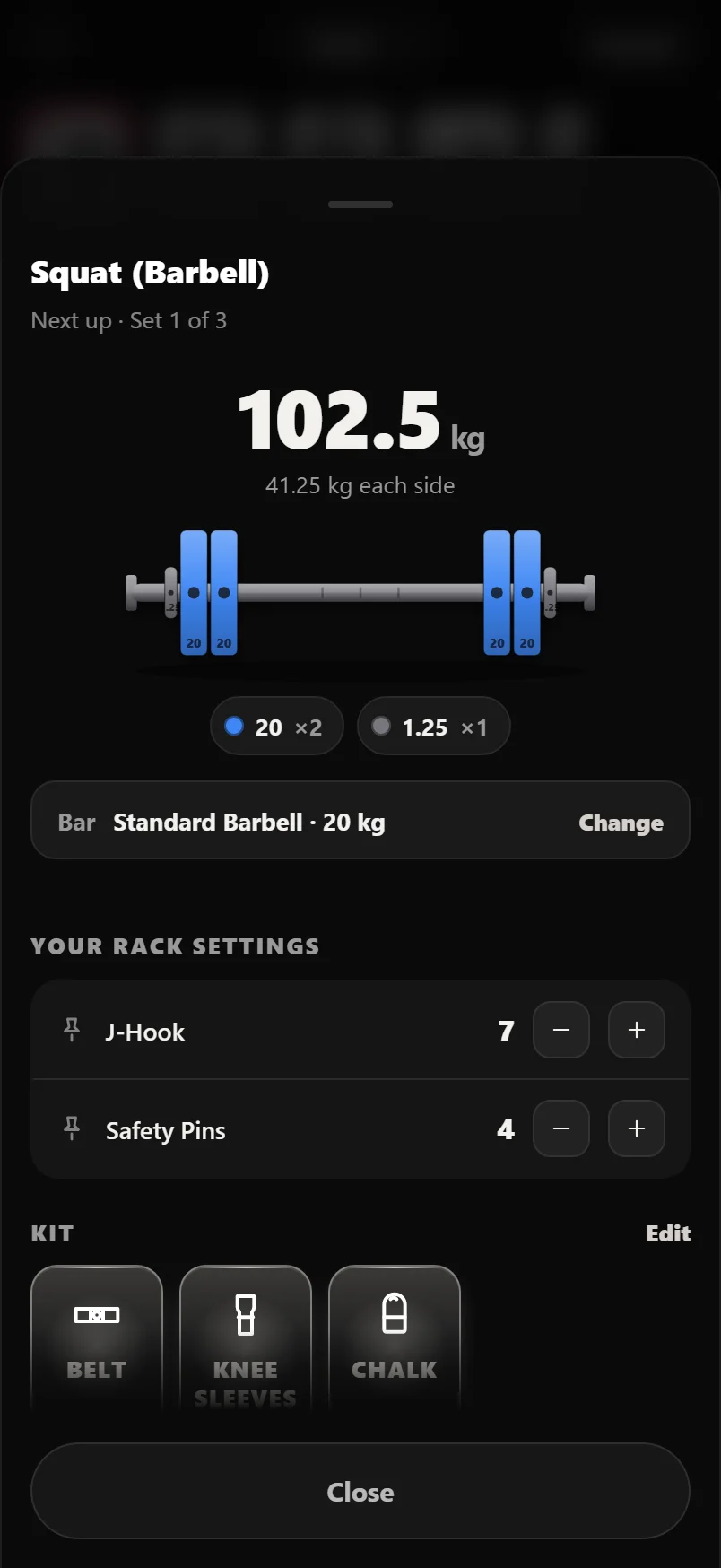
The sheet opens with the exercise name, the sets you have left, and the load. On a barbell lift that means the total in big type, what goes on each end, and a drawing of the bar with the real plates in their real colours, so you can check the picture against the rack instead of reading a list. It only uses plates you've told it you have, and it subtracts the bar you've selected, so the answer is one you can actually load. Tap the Bar row to switch to the EZ bar, the hex bar or a custom one, and the maths redraws underneath.
Other equipment gets its own version of that. Dumbbells show a pair, with what the two add up to underneath, or a single bell on a single-arm lift, so the picture matches what you'd actually carry to the bench. A kettlebell shows one bell, a loadable plate what's in your hands rather than what's on two ends, a band its colour and anchor height, a suspension trainer a strap notch, and a weighted chin-up what's hanging off the belt. Machines have their own section further down.
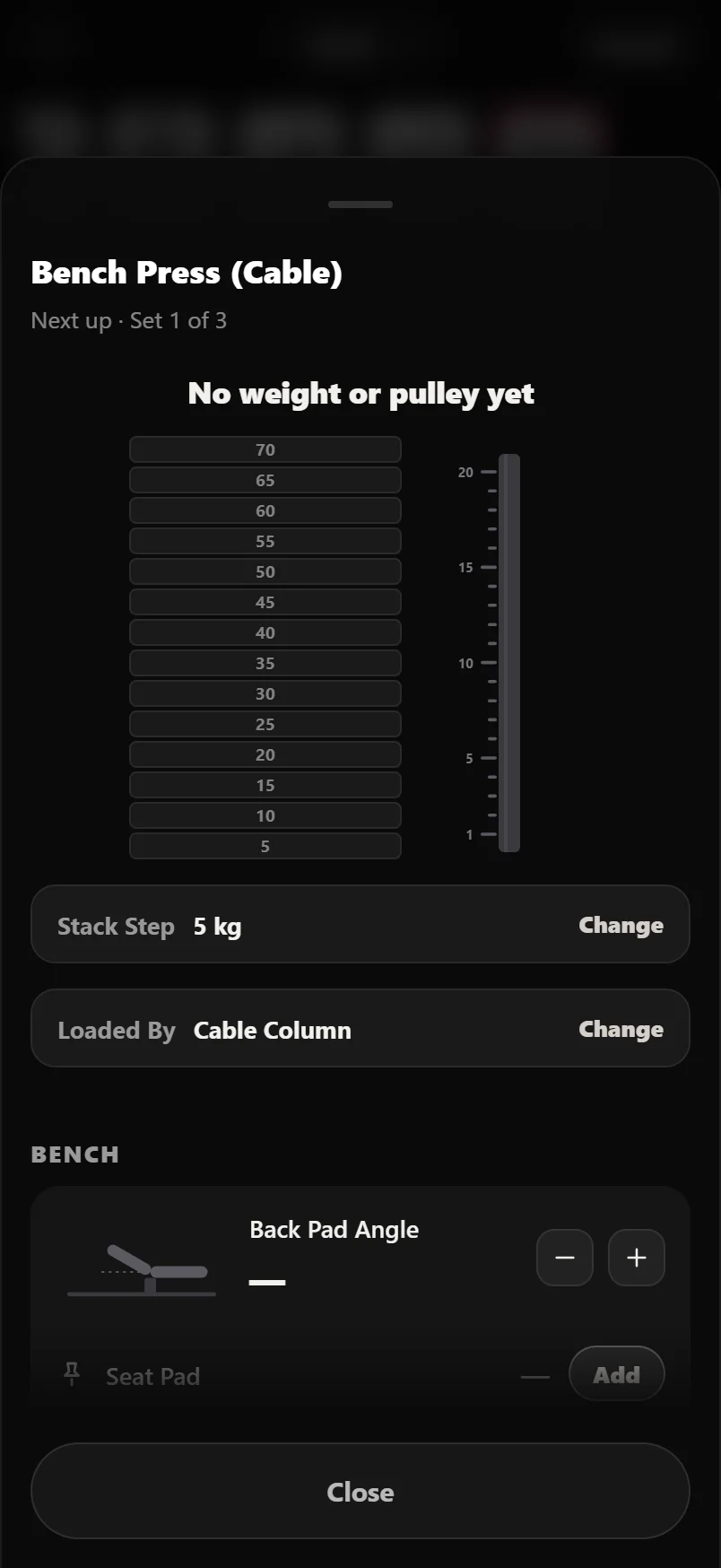
On a lift you have never logged there is no weight to work from, and the sheet draws anyway. The bar is there, solid, because the bar is known; the plates are dashed outlines in the place plates go. A stack draws with no pin in it, a cable column with no carriage on it, a pair of dumbbells with no number under them. Nothing is ever parked at a guessed default to fill the frame, so the drawing is never wrong. It shows you what it is still waiting for. A bodyweight lift is the one that is not waiting: it says Just you, and outlines a belt for the day you hang something off one.
Under the load sits everything you can save for this exercise: the positions that type of machine has, a bench angle if the movement uses one, your kit and your own note. What you've already set up comes first. Anything you haven't set folds into one Add row underneath (Add rack settings, Add kit, Add a note), so nothing empty sits above something you use. How to do it, with the demo clip, comes last. There's no Save button and nothing to cancel. Every control writes as you touch it, which is why the only button on the sheet says Close.
Five ways in
There's no Setup button buried in a menu. The sheet opens from five places, each one where the question actually comes up.
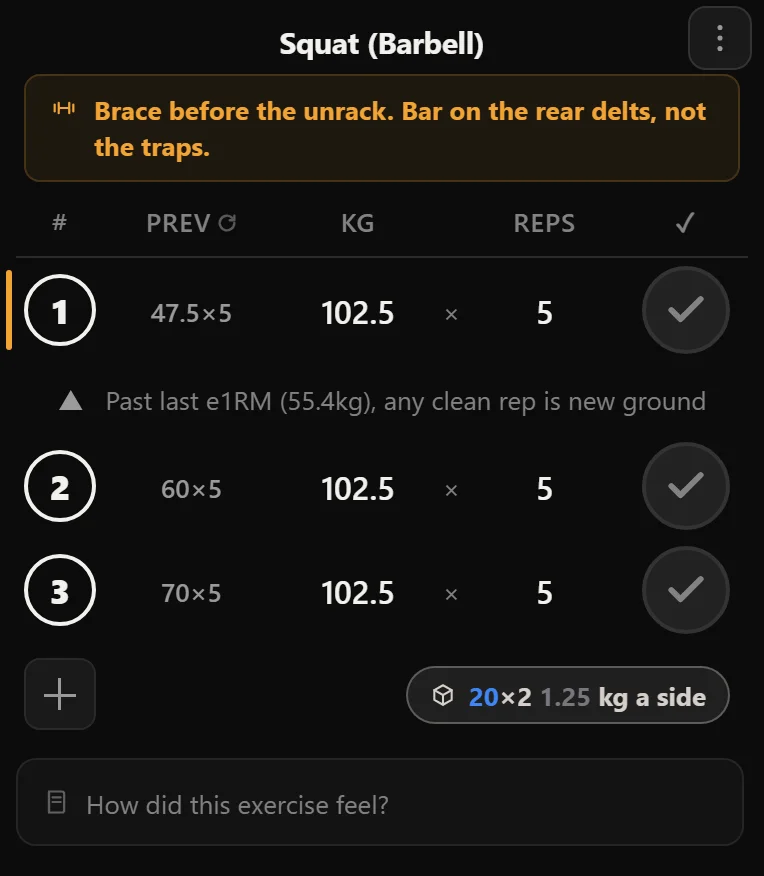
In the logger, every exercise card has a chip at the bottom right. Once the next set has a weight on it, the chip stops saying Setup and shows the answer instead: 20×2 1.25 kg a side, or Pin 12, or 2 × 30 kg. Tap it to open the sheet. The chip only ever uses one line, so on a very heavy bar with a long plate list it goes blank and lets the sheet carry the detail, rather than showing you half a load.
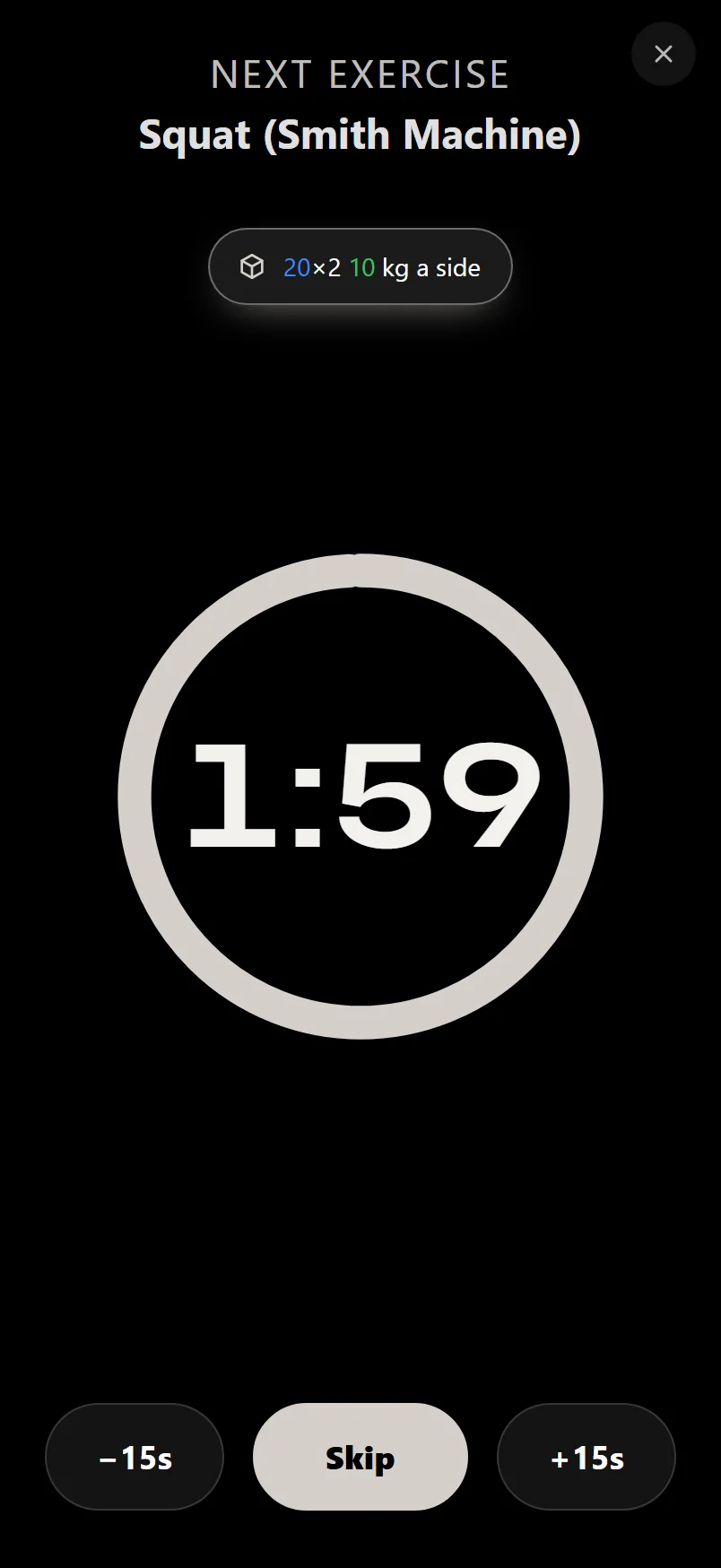
On the rest screen, when the next thing up is a different exercise, a Setup Next pill appears under its name with the same preview on it. Between sets of the same exercise there's no pill; the screen just tells you if the weight is changing. In a planned session, every exercise row has a setup button, and it lights up when that exercise already has something saved. On an exercise's own page, the Setup cell in the ⋮ menu opens the same sheet without the load section, because there's no workout behind that screen to have a weight in it.
The session editor, where you build or change a routine's day, carries the same chip beside the + Set button. It replaced the old amber equipment and incline pills, so dialling in the bench angle or the kit a session expects is now one tap on the same sheet everywhere else uses, rather than a separate drawer for planning.
- In a workout: tap the chip at the bottom of any exercise card.
- During rest: tap Setup Next when the next exercise comes up.
- Before a session: open the planned session and tap the setup button on any row.
- Editing a routine: open the session editor and tap the chip beside the + Set button.
- Anywhere: open the exercise from the library, open the ⋮ menu, and tap Setup.
The rest screen does the sums for you
Finish the last set of an exercise and the rest screen tells you what's next and what it needs. A pill under the exercise name carries the setup itself: the plates, the pin, or "2 × 17.5 kg" on dumbbells. On a barbell lift the job is usually done without a tap: read the plates, walk over, load it. The weight isn't repeated under the name, because the pill already says it. If nothing is set up for that lift yet, the pill reads Setup Next.
Tap the pill and the full sheet opens over the countdown. The timer keeps running underneath, and the preview on the pill updates as you change things, so switching to the EZ bar or fixing the machine's load type while you rest costs you nothing.
Between sets of the same exercise there's no pill, because there's nothing left to set up. The bench is set, the pin is in, the kit is on. The only thing that can have changed is the weight, so that's the only thing the screen mentions. If the next set is a different weight from the one you just did, a plate line appears under Set 3 of 5. If it's the same weight, nothing appears. Straight sets never see it. Pyramids, Dropsets, Backoffs and Warmup ramps are where the sums are real, and that's where it shows up.
Plate lines count repeated plates, so one size reads "20 kg ×4 a side" and mixed sizes read "20×2 2.5 1.25 kg a side". The line is never wrapped: if it is too long for one line it drops out instead of trailing off, for the same reason the chip does.
Machines: pin stacks, plate-loaded, cable columns, plate-loaded cables and added weight
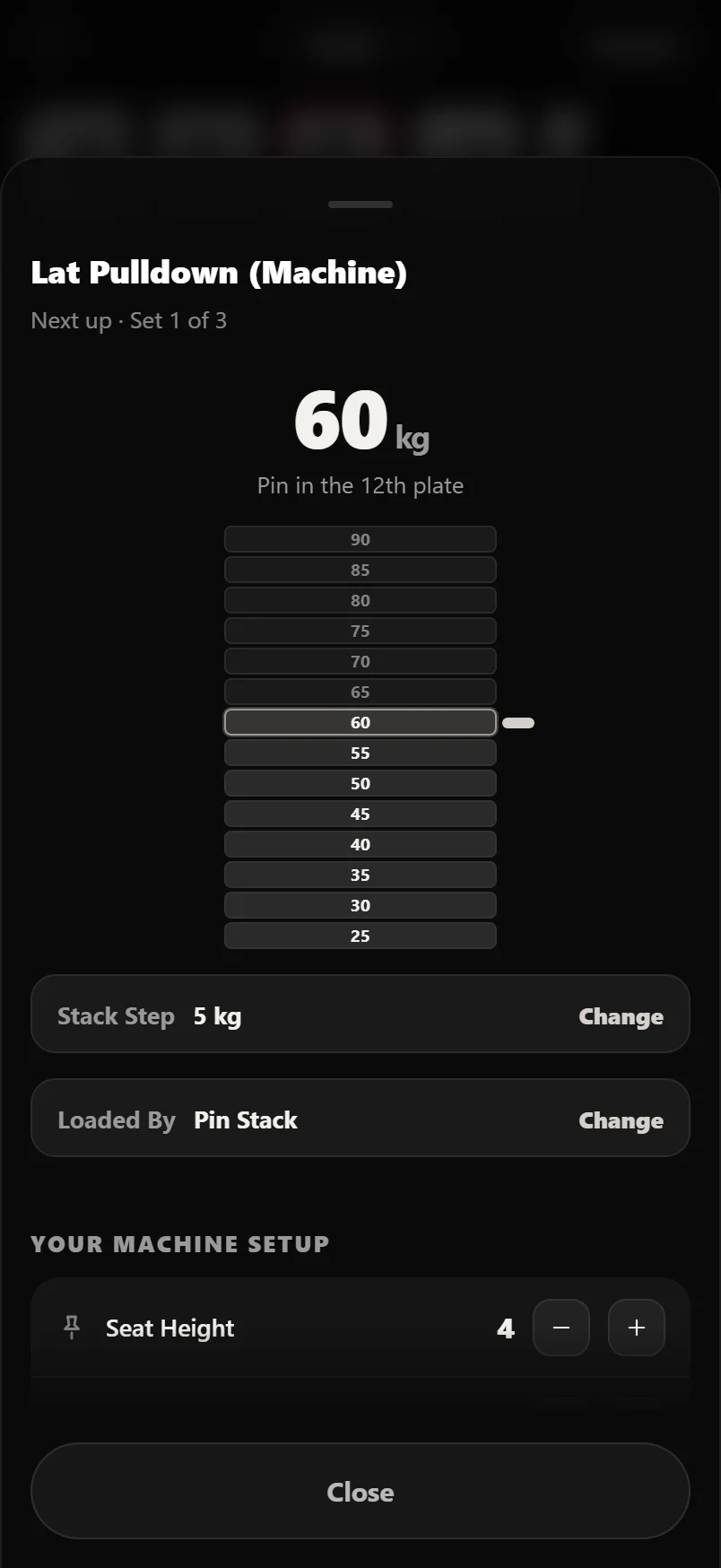
Machine covers several very different things. Most machines are a selectorised stack with a pin in it. Leg presses, hack squats, pendulum and belt squats, iso-lateral arms and every Smith bar are loaded with plates and have no pin at all. That matters, because the headline number on the sheet is which plate the pin goes in, and on those machines there isn't one.
So the sheet asks. The Loaded By row offers Pin Stack, Plate Loaded, Cable Column, Plate Loaded Cable or Added Weight. Durata guesses from the exercise name and gets the obvious ones right, and the row is there so a wrong guess takes one tap to fix. Plate Loaded Cable is the one it never guesses: nothing in an exercise name says whether a cable station takes a pin or takes plates, so that one is always a choice you make yourself, saved for that exercise like everything else here.
A pin stack is drawn as a stack with the pin in place, and the sheet says which plate that is. It assumes 5 kg a plate. If your gym's stacks run in tens, or in something odd, the row under the stack changes it, and you only have to say so once. Plate Loaded draws the weight as plates and splits it over two pegs, which is what most of them have. Some don't: plate-loaded leg extensions and leg curls are often built with a single horn, and being told to put 20 a side on one of those loads it to double. The Loaded On row under the plates says Both Sides or One Side, and on One Side the sheet shows the whole load in one place. Smith lifts don't get that row, because a carriage runs on two rails. Added Weight is for the weighted chin-up and the weighted dip, where the number isn't a stack at all but what's hanging off you.
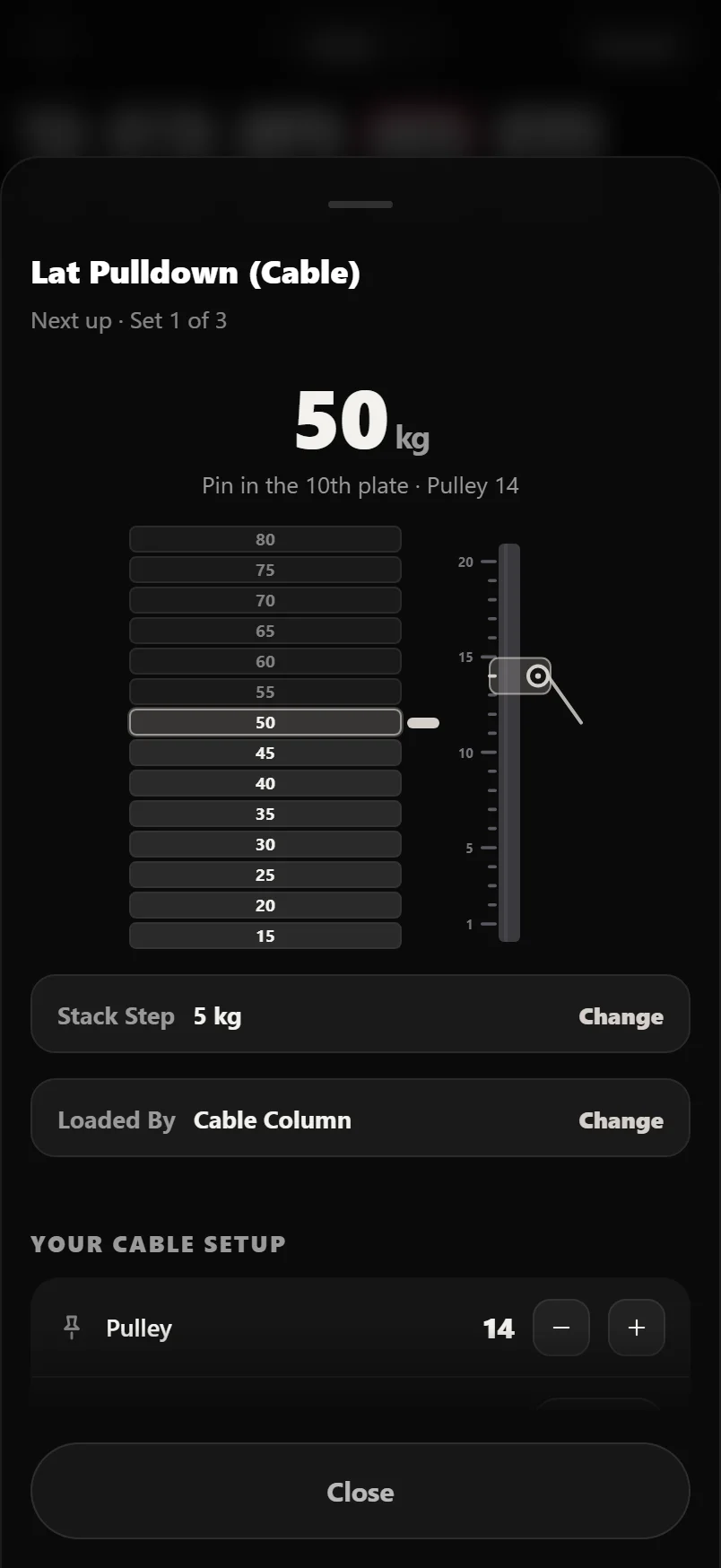
Cable Column and Plate Loaded Cable are the two cable builds. A pin-stack cable station has a pin like any stack, but the number you actually forget between sessions is how high the pulley was, so it draws both: the stack with its pin on the left, and the column beside it with the carriage sitting at your saved notch. A functional trainer or cable stack you load with plates rather than a pin is Plate Loaded Cable. It draws the same way Plate Loaded does, plates on a horn, split over both faces by default or all on one side with the Loaded On row, but with the pulley column drawn alongside it, because that kind of machine still has a height to save. The rows underneath a cable lift are the ones a cable station has (Pulley, Numbered From, Handle, Seat Height and Thigh Pad) rather than the chest pads and foot plates of a fixed machine. Durata reads the exercise name to spot cable work, which catches the face pulls and pushdowns that never say the word, and if it gets one wrong the Loaded By row is the fix.
Columns aren't numbered the same way in every gym. Every cable lift shows a Numbered From row, set to Bottom by default, whether or not you've saved a pulley height yet, so you can get it right before the first number ever goes in. Switch it to Top and the drawing flips, so the carriage sits where your machine says it does. It's saved per exercise, so you set it once for the station you use.
Under the hero sit the positions: seat height, back pad, thigh pad, chest pad, foot plate, handle and range limiter. They're steppers with no keyboard, because a seat notch isn't a unit. The number means whatever that machine's own scale means, which is all you need written down. Once you've saved one, it sits as its own row with a small +/- right there to nudge it; anything you haven't set yet stays out of the way as a compact Add chip underneath, so a sheet with one saved position doesn't bury it under six empty rows.
Smith machines and what the carriage weighs
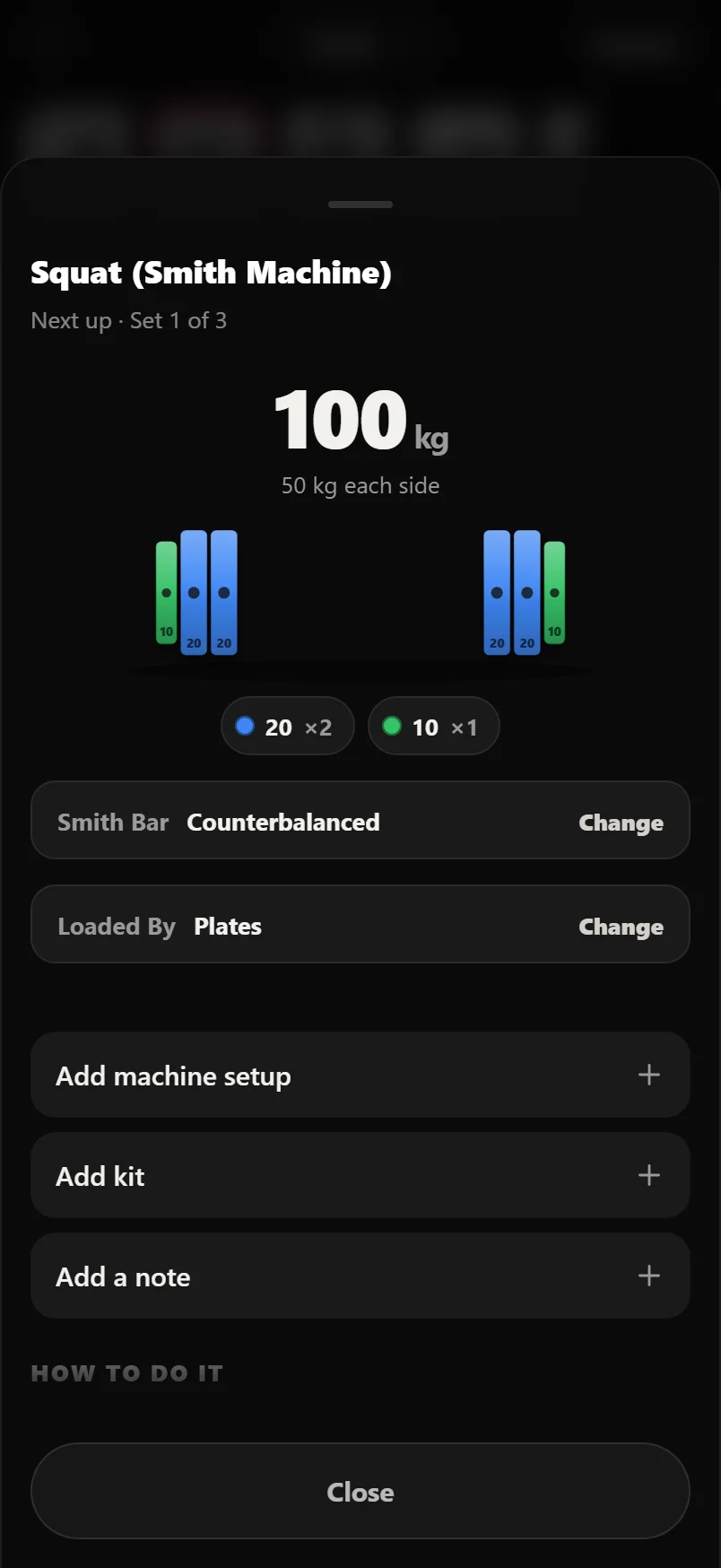
A Smith carriage runs on rails and is usually counterbalanced, so it weighs nothing like a barbell in your hands. Commercial machines range from almost nothing up to a full bar, and no two brands agree. There's no sensible default, so the default is zero: Smith lifts count the plates you put on and stop there, and the Smith Bar row reads Counterbalanced until you change it.
Tap that row and set what your machine's carriage actually weighs. From then on it comes off the total before the plates are worked out, on every Smith lift. The same number lives in Settings under Plate Calculator if you'd rather set it there. Hang a luggage scale off the carriage if you want it exact.
The carriage isn't an entry in your bar roster. The roster decides the weight every free barbell lift is judged against, and a counterbalanced carriage shouldn't be rewriting that, so the carriage weight is kept as a separate number that only Smith lifts read.
Bench angles and seat notches
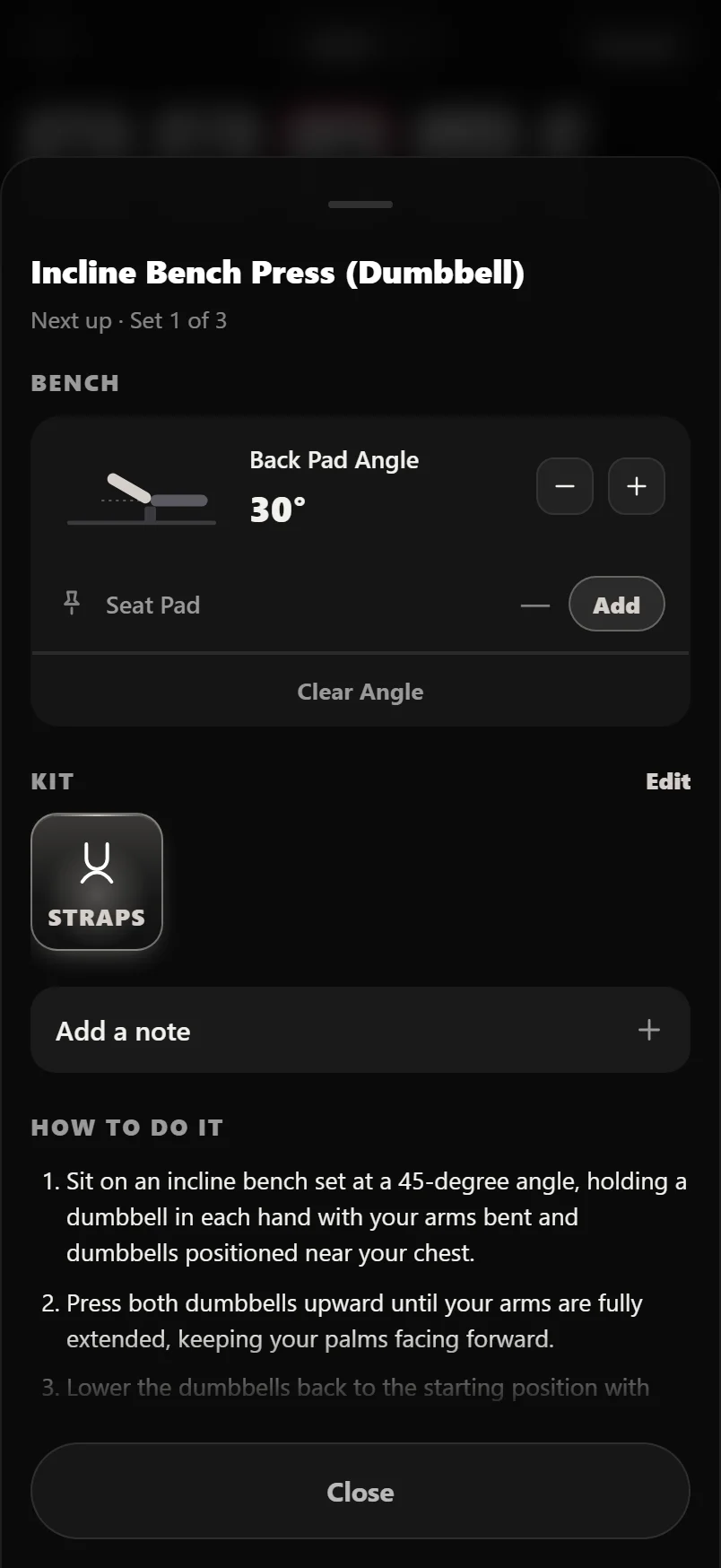
Any lift with incline, decline or bench in its name gets a bench card, and the bench is drawn at the angle you've set rather than just named in a label. Nudge it with the plus and minus buttons and the drawing follows.
The back pad angle isn't a new setting. It's the same saved incline the logger and the exercise page already use, so changing it here changes it everywhere, and last session's angle is offered as a one-tap suggestion if you haven't set one. The seat pad is separate, because most adjustable benches number the seat rather than marking it in degrees, so it is saved as a notch for that exercise alone.
Kit, and the thing you always forget
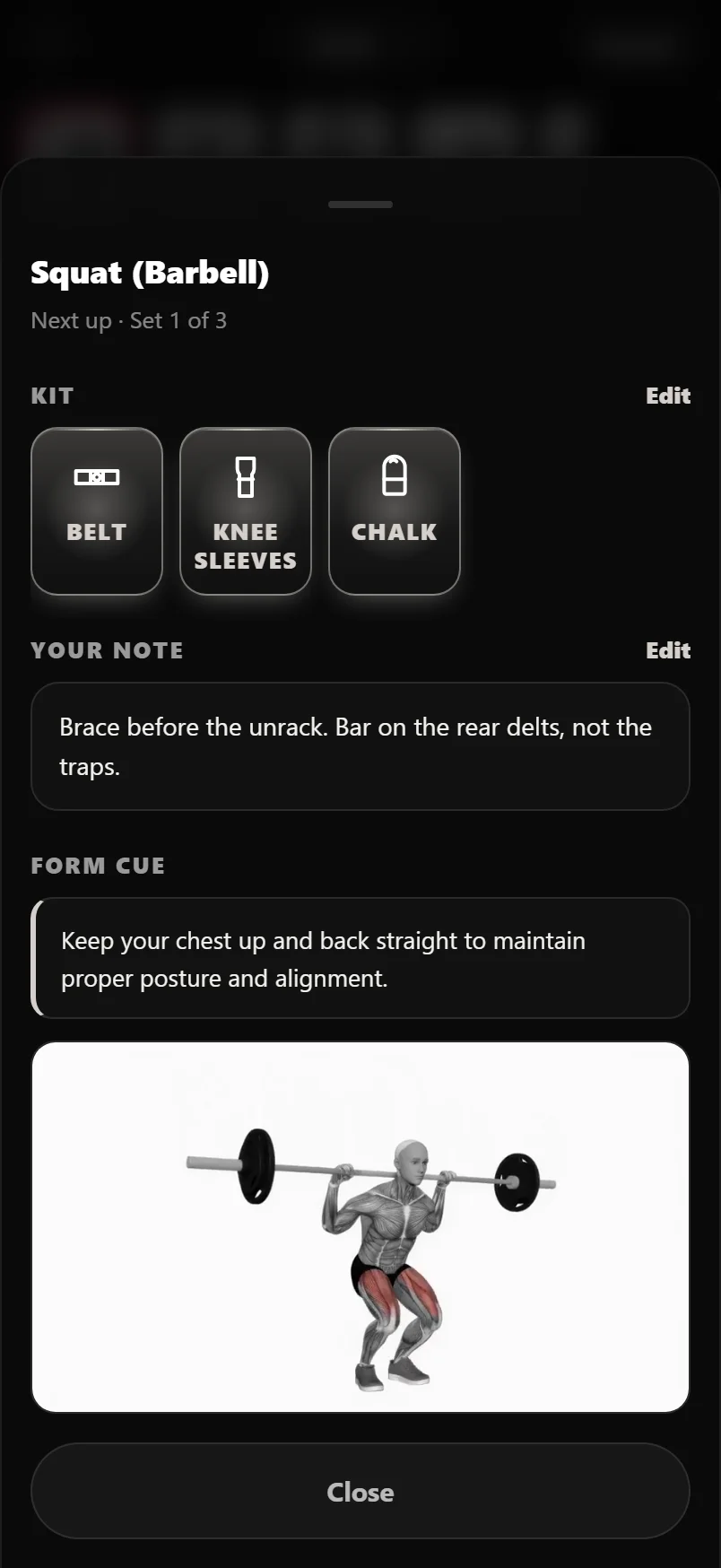
Kit is what you pick up on the way: belt, sleeves, straps, chalk, wraps, shoes. Each piece is a drawn glyph with its name under it, rather than the plain text chips it used to be, because the question here is what to carry over and a picture of a belt answers that faster than a row of words. Built-in gear gets a proper icon. Anything you've added yourself gets a monogram tile, since the app can't draw a name it's never seen. The list of kit itself lives in Settings under Equipment Tags.
What you used last time is offered, not assumed. If you had straps on for deadlifts last week, the card says so and puts them one tap away instead of quietly switching them on. During a workout the kit shown is what you're using today; outside a session it's the saved default for that exercise.
Your note is the free-text half: a cue, a hole number, which rack in the corner has the good bar. It sits under the kit, it's saved per exercise, and it shows on the logger card too. Below it the sheet shows a form cue and the demo clip. On an exercise you've never set up it leads with the first few how-to steps instead, because on an empty sheet those are more use.
To start a lift over, Clear Setup sits at the foot of the sheet beside Close once anything is set. After a red confirm it clears this gym's rack settings, the angle, the kit, the bar and the note for that lift.
Where the numbers come from
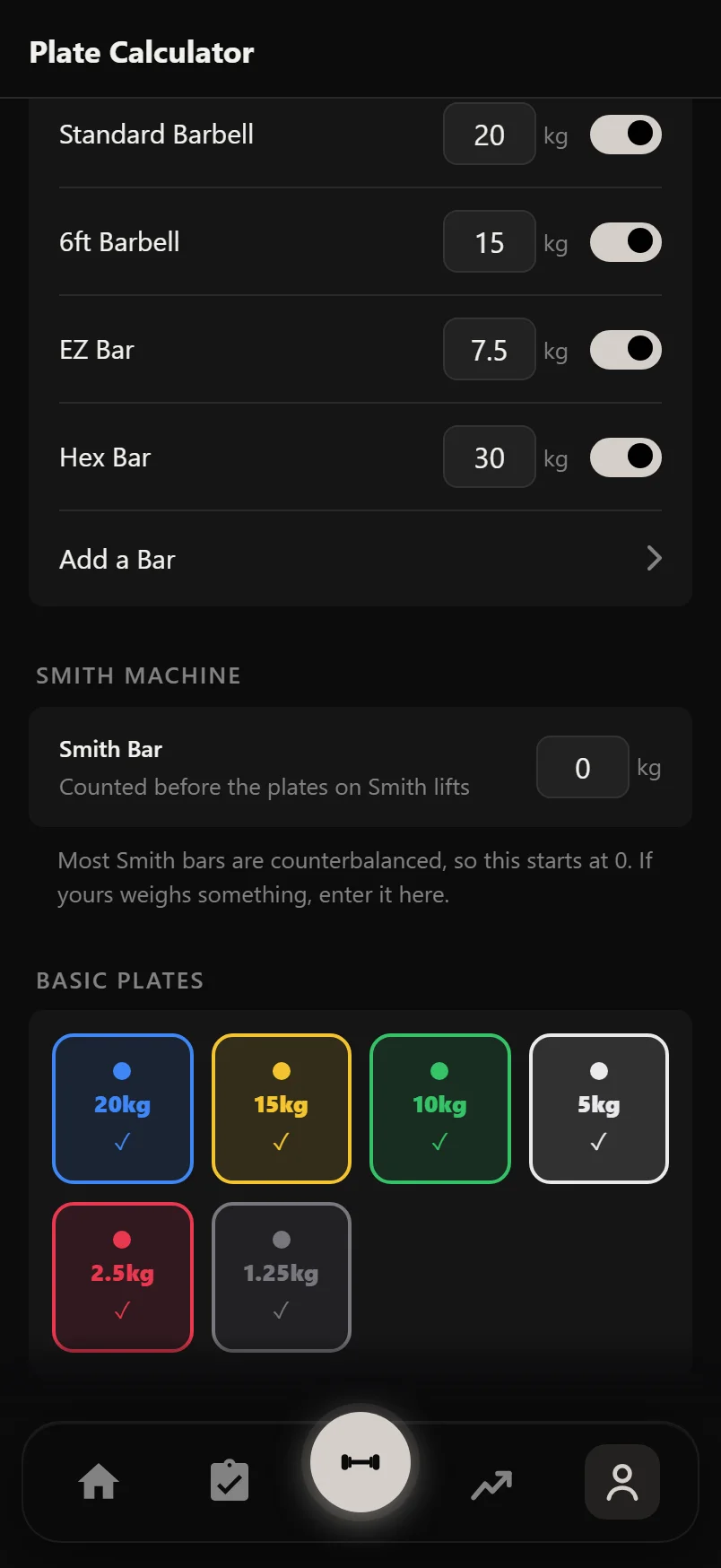
Everything the sheet draws comes from equipment you've described once. Settings, then Plate Calculator, holds your bars and your plate inventory. Add a custom bar, tick the ones your gym has, untick the plates it doesn't, and every plate drawing in the app narrows to what you can really load. The Smith carriage weight is on the same screen. Settings, then Equipment Tags, holds the kit list, including anything you add yourself.
Positions, angles, kit and notes are saved per exercise and sync with your account, so a machine you set up on your phone is already set up on the tablet. None of it is per workout and none of it expires. Set the seat once and it's waiting every week.
- Settings, then Plate Calculator: bars, plate inventory and the Smith carriage weight.
- Settings, then Equipment Tags: the kit list, built-in and custom.
- Everything else is set on the sheet itself, per exercise, and saved as you touch it.
An empty sheet still draws. Dashed outlines are the parts it is waiting on, solid is what it already knows, and nothing on it is ever a guess.
The preview chip is one line or nothing. If it's gone blank on a very heavy set, open the sheet for the full breakdown.
No plate line between sets means the weight hasn't changed. It only speaks up when the load moves.
The setup button on a planned session lights up for exercises that already have something saved, so you can see what's left to dial in.
Changing the bar in the sheet only changes the maths for that lift. Your default bar stays in Settings.
If a plate-loaded machine has one horn rather than two, set Loaded On to One Side and the sheet stops halving the weight.
Single-arm dumbbell lifts draw one bell, not two. The app reads that off the exercise name, the same way it works out the volume.
If your cable column is numbered from the top, say so once in the Numbered From row and the drawing follows your gym from then on.
Common questions
Does the plate breakdown know which plates I actually own?
Yes. It works from the plate inventory in Settings, then Plate Calculator, so it'll never tell you to put on a 15 you don't have. If your gym is short of a size, untick it there and every breakdown in the app works around it.
Why does my Smith machine squat count less than the same weight on a barbell?
Because the Smith carriage counts as zero by default, while a barbell counts as 20 kg or 45 lb. Counterbalanced carriages really do range from almost nothing to a full bar, and no two machines agree, so guessing would be worse than asking. Weigh yours, set it in the Smith Bar row or in Settings, and it comes off the top from then on.
The sheet thinks my machine has a pin stack and it doesn't. Can I fix it?
Tap the Loaded By row and pick Plate Loaded, Plate Loaded Cable for a functional trainer you load with plates, or Added Weight for a weighted chin-up or dip. The app guesses from the exercise name for the first four, but Plate Loaded Cable is never guessed. It is always a one-tap choice you make yourself, and it's saved for that exercise for good.
Do I have to set this up before I can log a workout?
No. None of it is required and nothing nags you. The sheet is useful the first time you open it, before you've saved anything, because the plate maths and the pin number are worked out from the weight alone. On a lift with nothing logged at all it still draws the equipment, with the parts it doesn't know yet left as outlines, so you can see what saving one number would buy you. Saving positions just means you don't have to think about them again.
I train at two gyms with different plates. What happens?
Add the second one. Settings, then Gyms, then Add a Gym, and every number on this sheet gains a per-gym answer: the bar roster, the plate inventory, the Smith carriage, the dumbbell rack, and every machine position you have saved. Bars and plates carry over from your main gym so there is nothing to re-describe; machine positions do not, because a pin hole here means nothing there. One chip on the sheet says where you are. It is hidden during a live workout, because a session belongs to the gym it started at. See Gyms for the whole picture.
Is Setup Next part of Pro?
Yes. Setup Next and the second gym are one Pro entitlement: the saved positions, the plate maths on the sheet and the rest-screen preview are all part of it. Nothing marks it in the logger. On a free account the chip keeps its plain Setup label, the rest screen shows no pill, and tapping the chip shows you Pro.
Does any of this change what my numbers mean?
Only the Smith carriage does, and only on Smith lifts, where it's added to the plates you logged. Everything else on the sheet is about setting the equipment up, not about scoring the set. Rack holes, seat notches, kit and notes are recorded alongside the lift, not folded into it.
Put it into practice
Durata is free to use — 50 proven programs, automatic progression, rest timers and PR tracking, all on your phone.