


Gyms: training in more than one place
Lots of people train in more than one place: a big gym in the week, a rack in the garage at the weekend, a hotel gym on holiday. The kit is different in each.
Add a second gym and each place gets its own answers: what is on the bar, which hole the pin goes in, what a dumbbell jump is, and whether a lift was your best ever or your best there. This guide covers adding a gym, switching, what carries over, and what your history does with it.
Last reviewed 2026-10-26 · matches app v1.1.1.105
Adding your second gym
With one gym, none of this shows. There is no gym chip and nothing extra to fill in.
Go to Settings, then Gyms, then Add a Gym. A name is all it needs. You can also pick an icon and say what kind of place it is. That helps the fit check later, but it is optional.
When a second gym is added, your first one needs a name too, so the sheet asks for both. It is My Gym unless you change it. Everything you have already logged and saved becomes that gym's. Nothing is moved, copied or reset.
A blank name, or one you already use, is flagged on the field when you tap Add Gym or Save. In the list, the gym you are at says Here Now.
Tap a gym in the list to rename it, change its icon or kind, or edit its note. Every gym except your main one has Remove Gym beside Save. Removing a gym drops its own kit, machine positions and swaps. Workouts you logged there stay in your history and count as your main gym.
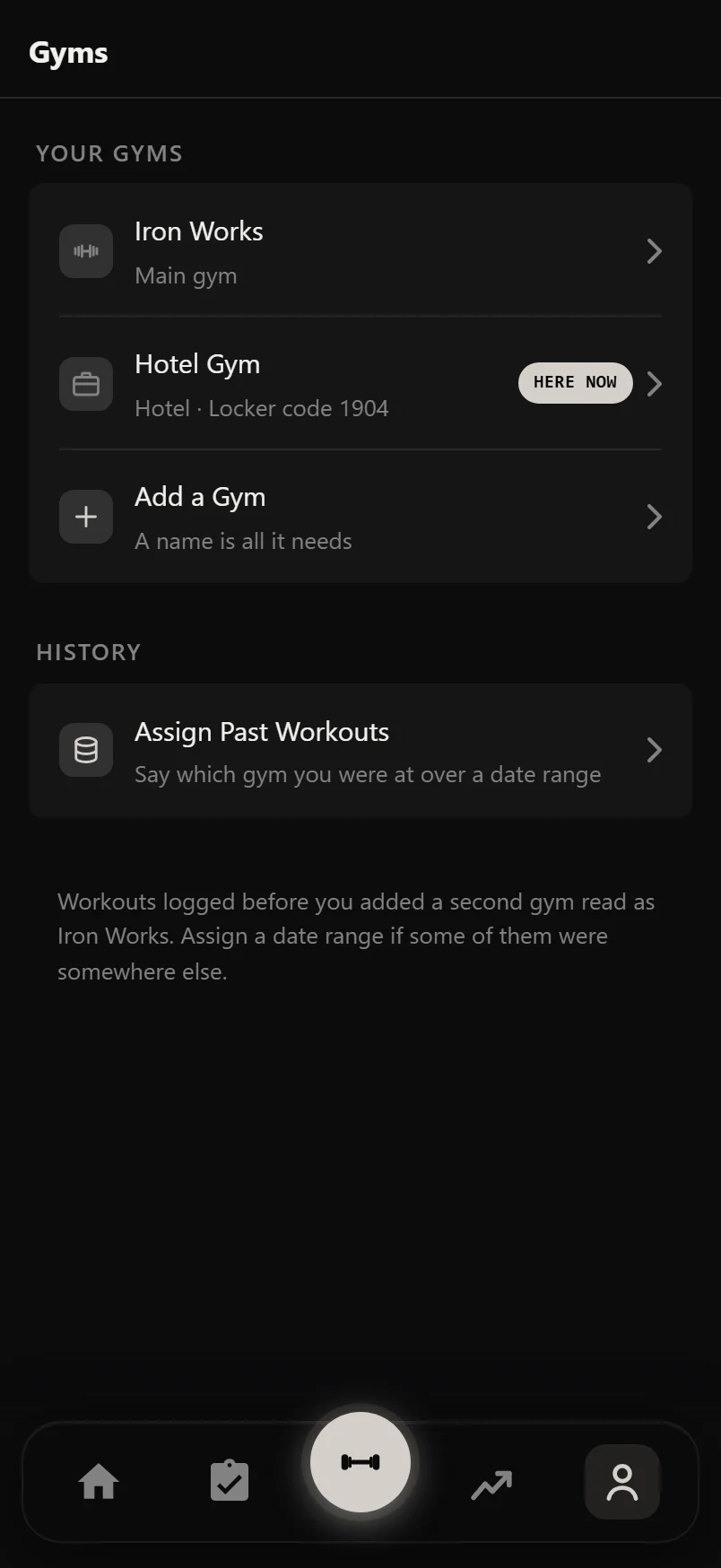
One chip says where you are
With two gyms, a gym chip shows wherever the numbers could differ: on a session's preview before you start, on the Setup sheet, and on the plate calculator in Settings. It names the gym you are at. Tap it, then tap a gym to switch. Each gym in the list says what it keeps different and when you last trained there.
There is no location permission and no check-in. A switch that guessed wrong without telling you would be worse than one tap.
Where you are is saved to your account, so it is the same on all your devices.
Give a gym a note, like the door code or which rack is yours, and it shows under the gym's name in the switcher, which is the list you open when you walk in.
During a workout the Setup sheet does not offer the switch. A workout belongs to the gym it started at. Finish it or discard it and the chip comes back.
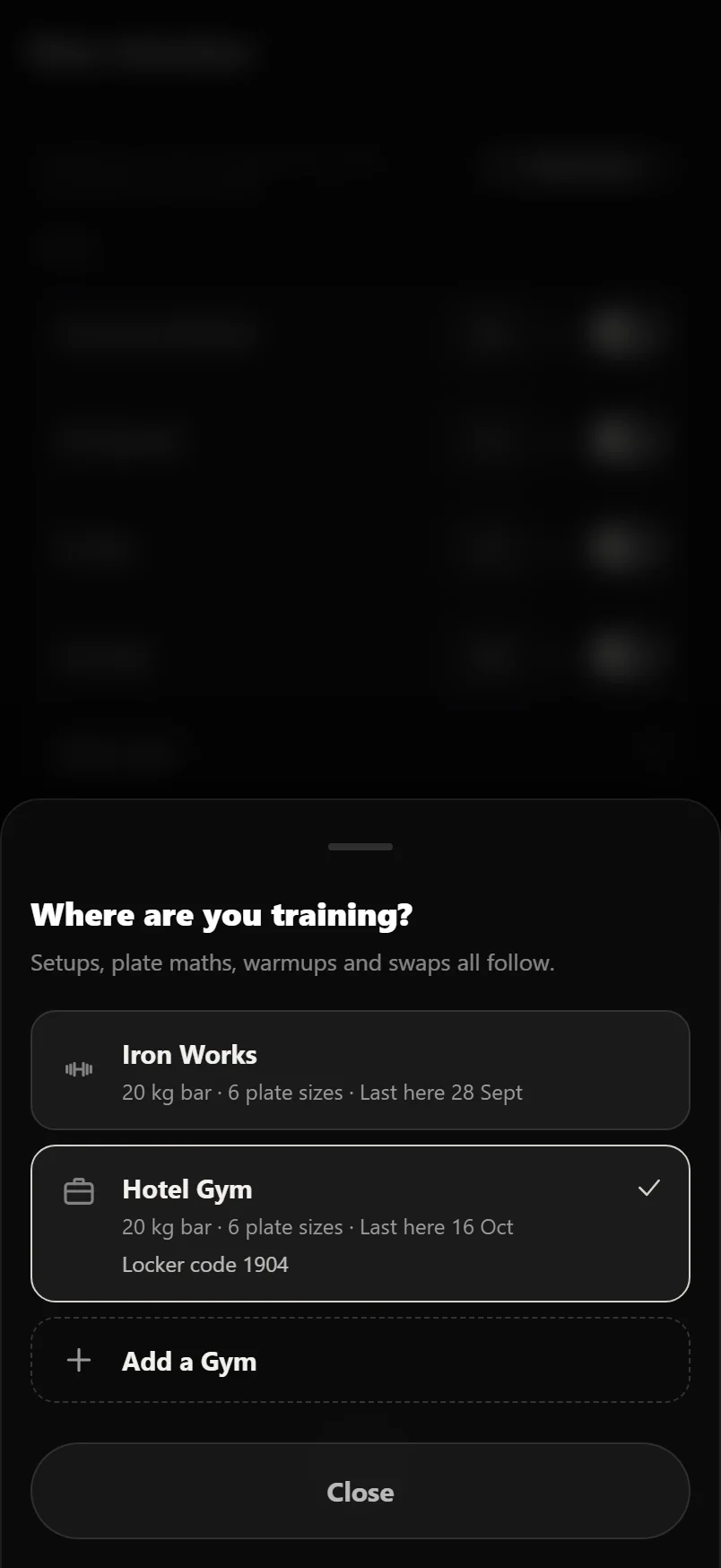
What follows you, and what stays put
A new gym starts as a copy of your main one, and you only change what is different.
Bars, plates and dumbbells carry over. A new gym uses your main gym's until you change them there, and then only the change is saved. If you later change your main gym's plates, every gym that never changed them follows.
A bar set for one lift carries over too. Set curls to the EZ bar and curls load an EZ bar at every gym, because an EZ bar weighs the same anywhere. Other lifts keep the standard bar. If a gym has no EZ bar, open the bar row there and pick another one for that gym only.
Machine positions do not carry over, because a pin hole or seat notch at one gym means nothing at another. Each gym keeps its own. Where your main gym has a number saved, the Setup sheet at a new gym lists it for reference, like "4 at Iron Works", with Add beside it. Nothing is saved for this gym until you add it.
The Smith machine bar never carries over. Their weights vary a lot, and a wrong one would change every Smith number you log. At a new gym it starts unset, with your main gym's weight shown only as a guide.
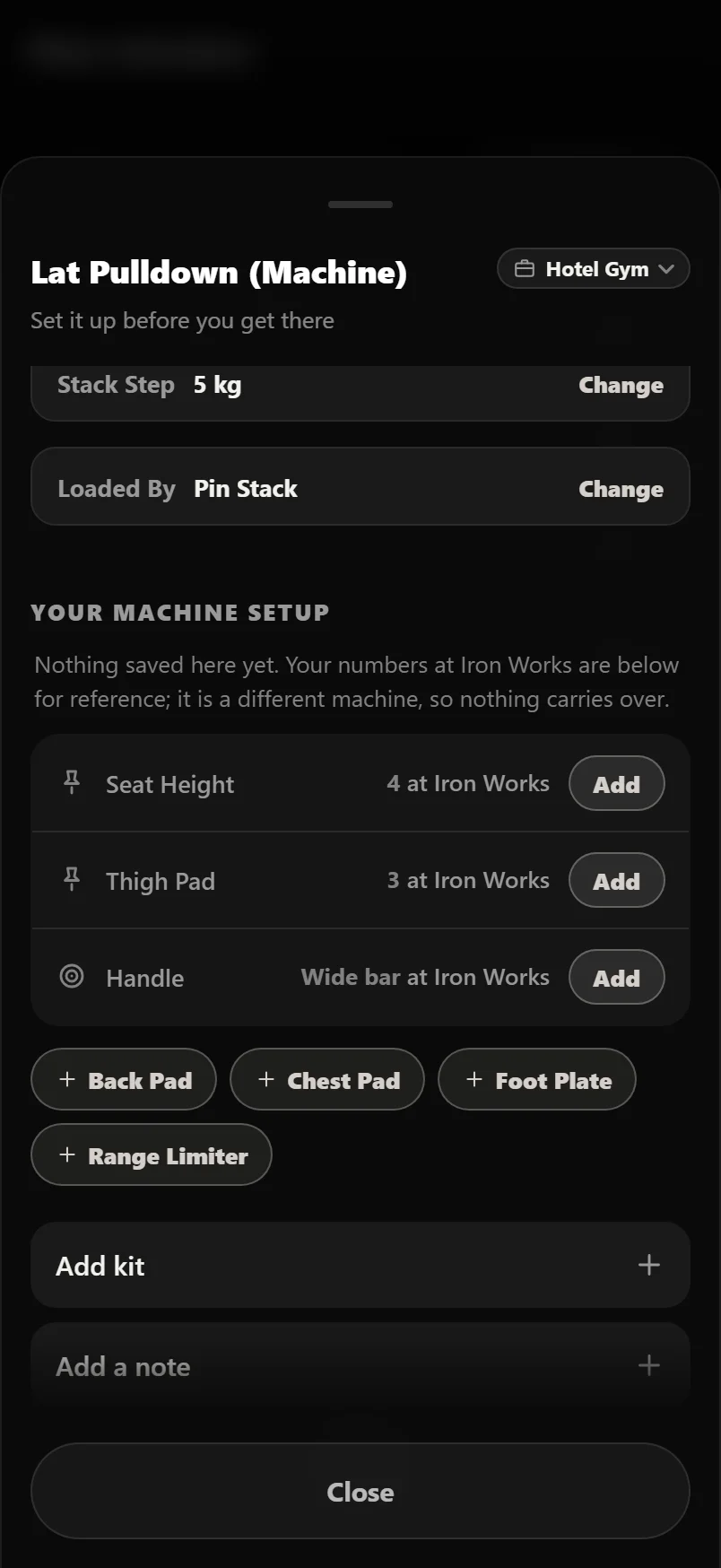
Bars, plates and dumbbells carry over until you change them. Machine positions never do.
The bar row on the Setup sheet and the bars in the plate calculator both set a bar for that one exercise, and both name the gym you are at, because a gym can use a different bar without changing the others.
Weights you can actually load here
Suggested weights, warmup steps and plate pictures are all rounded to what the gym you are at can load. A home rack with only 2.5 kg plates is told to jump in 2.5 kg. A gym with small plates gets the small steps.
If you have listed a gym's dumbbells, dumbbell weights round to one that is on the rack. With no rack listed, nothing changes. A second gym can also have an empty rack, so it stops using your main gym's dumbbells.
This only changes what you are told to load. Progression rules, targets and the weights you log are the same at every gym, so a bigger jump at home never makes your plan smaller.
When a gym is missing something
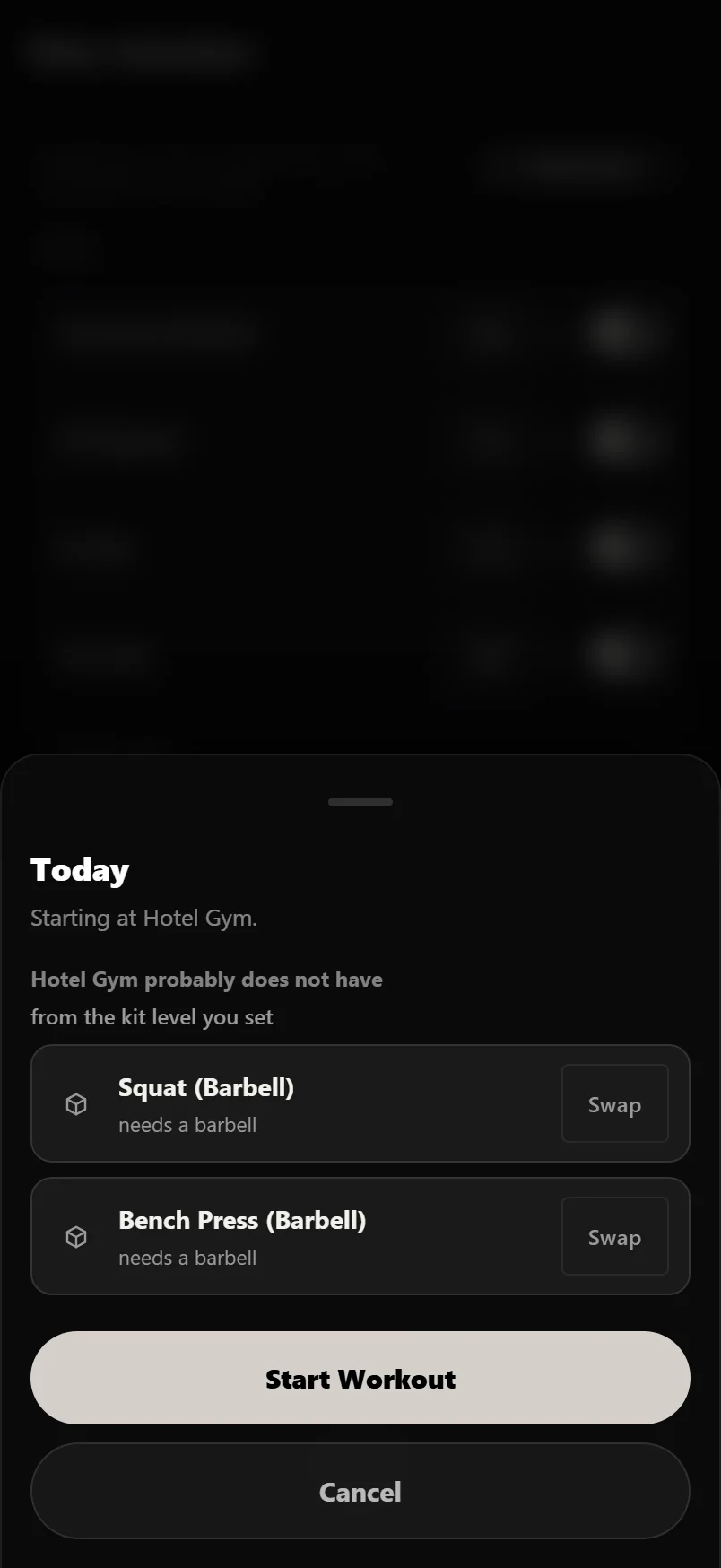
If you say what kind of place a gym is, starting a session at an added gym checks the session against it. If the session needs a cable machine and you are at a hotel with dumbbells and a treadmill, you are told before you start, not at the third exercise. Repeating a workout from History is checked the same way.
The sheet offers a swap for something the gym has. Take it and it is remembered for that gym, so the same session next month comes up already swapped. The swap is saved for that gym only. Your session at your main gym is not changed.
If there is nothing to flag, no sheet shows, and it never shows at your main gym.
Records that know where you set them
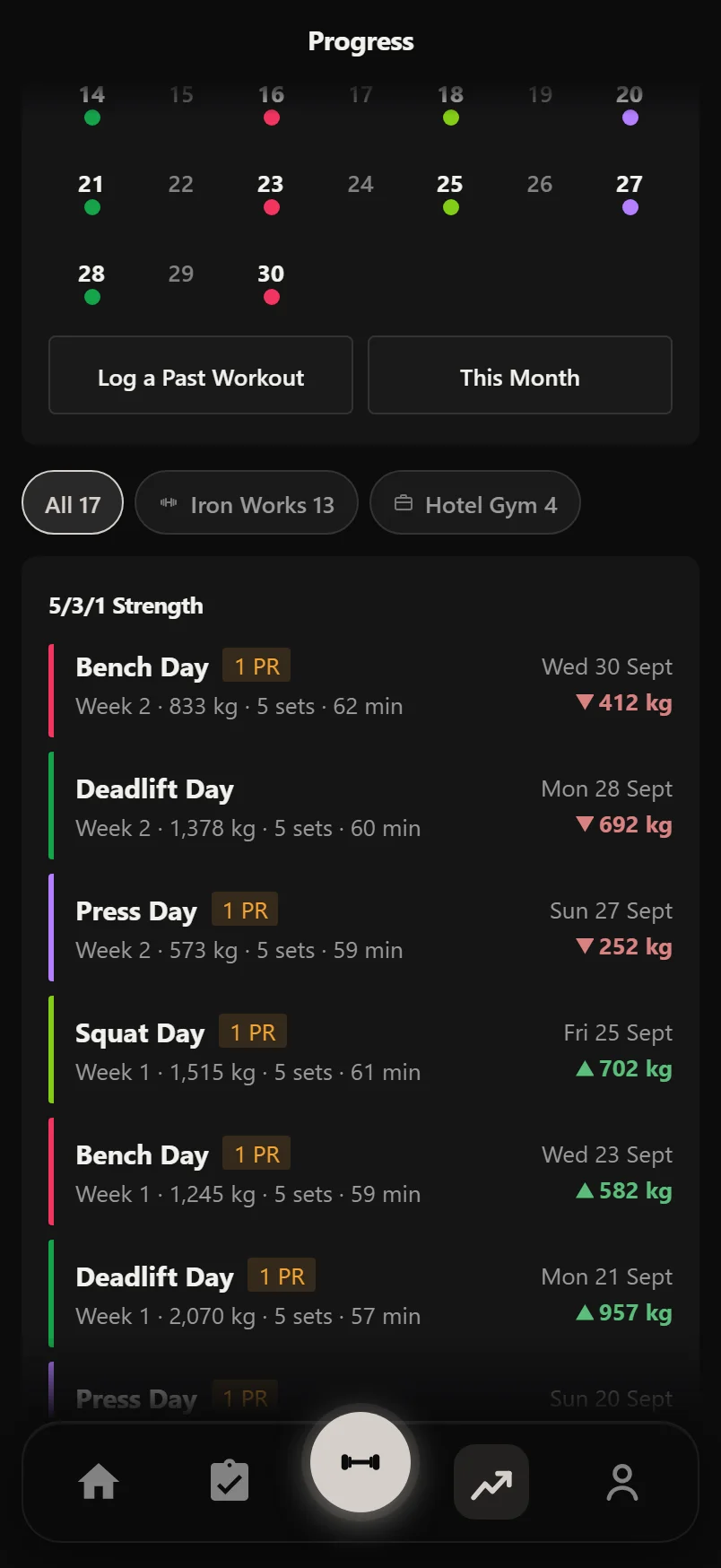
Every workout is marked with the gym you were at. Open a session and the gym is in its header beside the date. Tap it to change it if it is wrong. Once your history covers more than one gym, History has a chip for each, so you can look at one gym on its own.
Records come in two kinds: your best ever, and your best at this gym. They are worded differently. A gym record is only claimed when there is an earlier best at that gym to beat, so your first session somewhere new is a starting point, not a pile of records.
The gym name is added to what History shows, never in place of it. Where there is no room, like on a share card, the gym name is what drops.
Charts and comparisons, one gym at a time
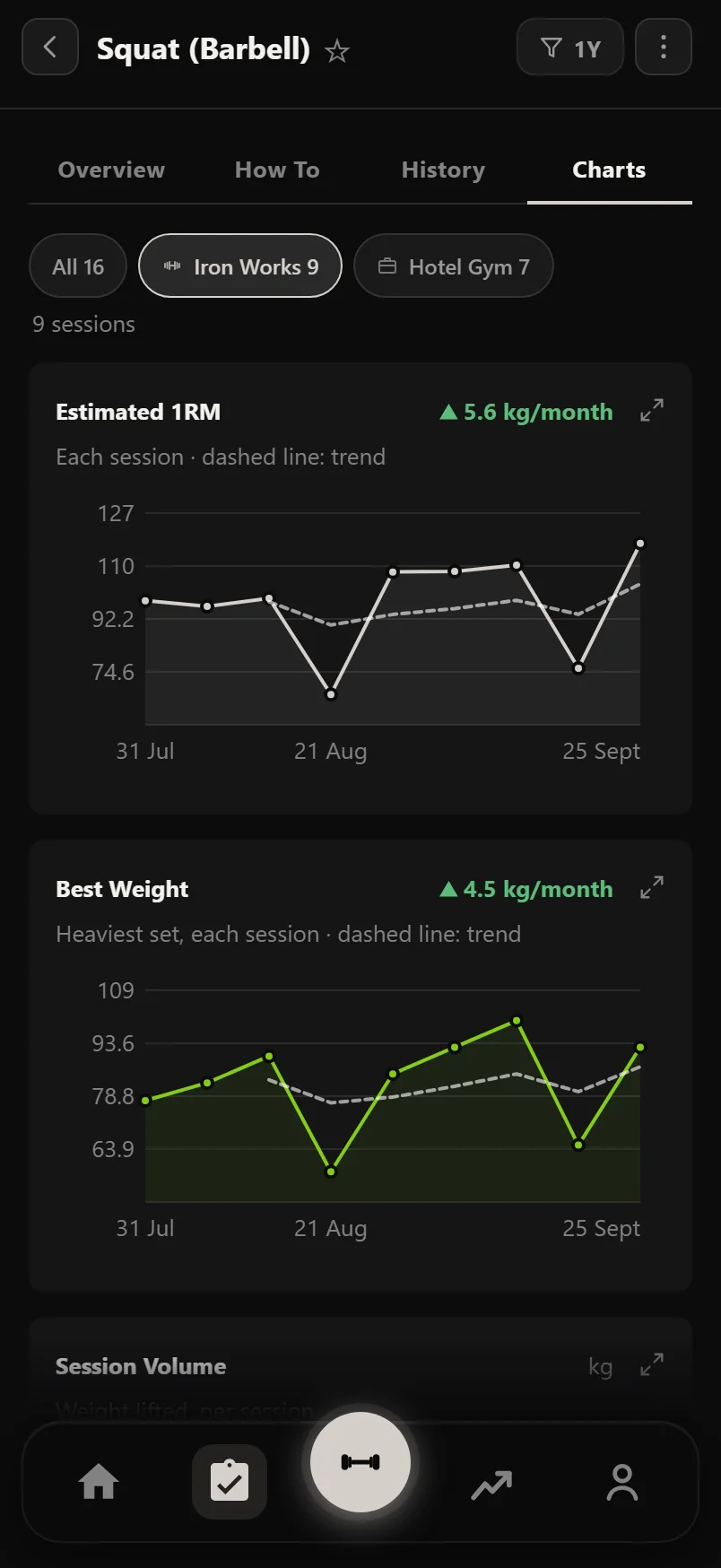
An exercise's Charts tab has the same chips. Pick a gym and the charts and counts show only sessions logged there, which helps with a lift you do heavy at one gym and light at another. Compare has its own chips too.
The record mark on a chart is always your best ever, whichever gym you pick, so it never claims a gym best as your record.
Once you have trained at two gyms, Home gets a Gyms tile with your sessions at each. Tap a gym's row and History opens on that gym. Tap the rest of the tile for all of History.
Fixing older history
Everything you logged before adding a second gym belongs to your main gym. That is right for most of it, but not for the fortnight you were away.
Go to Settings, then Gyms, then Assign Past Workouts. Pick a date range and a gym, and the workouts in it move to that gym in one go. You can run it as often as you need, and it only ever changes which gym a session says it was at.
To fix one session, open it in History and tap the gym in its header.
Common questions
Do I have to set up a new gym before I can train there?
No. Add it with a name, switch to it and start. Bars, plates and dumbbells carry over from your main gym, and machine positions fill in as you use them.
What happens to everything I have already logged?
It becomes your main gym's, and nothing about it changes. If some of it happened somewhere else, Assign Past Workouts moves a date range to the right gym.
Will a home rack with bigger plate jumps hold my plan back?
No. The gym you are at changes what you are told to load, not how your training is judged. Progression rules, targets and your logged weights are the same at every gym.
Is a best at my home gym a personal record?
It is a gym record, worded as one, and only claimed when you beat an earlier best at that gym. A best ever is a best ever wherever you set it.
Does the app pick my gym automatically?
No. You switch with one tap on the gym chip, with no location permission. Your choice is saved to your account, so it is the same on your phone and on the web.
How many gyms can I have?
As many as you train at.
Can I remove a gym?
Yes, any gym except your main one. Open it in Settings, Gyms, and tap Remove Gym. Its own kit, machine positions and swaps go. The workouts you logged there stay, counted as your main gym.
Is this part of Pro?
Adding a second gym is part of Pro. One gym is free.
Put it into practice
Durata is free to use — 50 proven programs, automatic progression, rest timers and PR tracking, all on your phone.