


The Workout tab
The Workout tab, the round button in the middle of the tab bar, is where every workout starts. It opens on today: what is due, what you missed, and what is coming.
This guide covers what it shows and how to start, catch up or skip a session. Logging Workouts picks up once a workout is running.
Last reviewed 2026-10-20 · matches app v1.1.1.105
Today's session
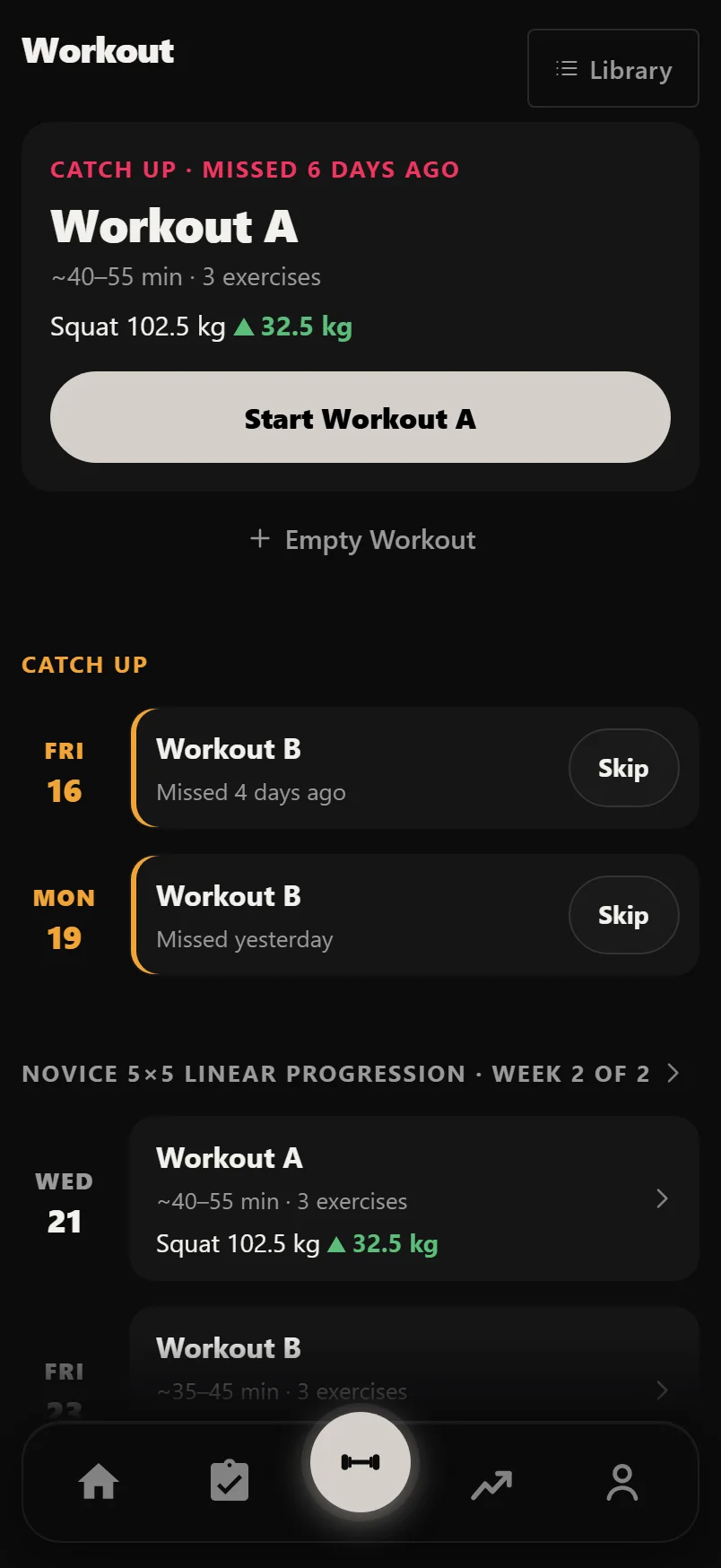
If your plan has a session today, it sits at the top as one card: the day, the session name, how long it should take, the exercises and the lead lift with its change.
Its Start button names the session, such as Start Workout A, and takes you straight in. Tap anywhere else on the card to preview the session set by set first. Sessions arrive filled in with their planned sets and your previous weights.
A plan that runs in order rather than on set days shows its next session instead, marked Next in your rotation.
With more than one plan running, each card names its plan.
Catching up on a missed session
Catch Up, under today's card, lists any session you missed in the last seven days, each with the day and how long ago it was. On a day with no session of its own, the oldest miss takes the top card.
Start a missed session from its card to make it up. Or tap Skip and confirm: the week can then finish without it. Keep It leaves it where it is.
A skip only counts for the week it was made in. It doesn't follow you into the next week.
The week ahead
Below Catch Up is the rest of your week: the next six days of your plan under the plan's name, with a Next week line where the week turns over. Each card opens its preview, and a session you have already done opens its History.
Tap the plan's name to open its planner. Back brings you to the same place on this screen. Library, at the top right, opens all your plans and sessions.
Your own sessions and an empty workout
Sessions you built that aren't in a plan show here too. Beside a plan they are listed as Standalone. With no plan running, they are Your sessions, each with when you last did it, such as "Last done 3 days ago".
+ Empty Workout starts a workout with nothing in it, for when you want to add exercises as you go. On a rest day with nothing owed, Start Empty Workout leads the screen.
On a new account the screen is just the ways in: Start Empty Workout, Browse Programs and Import History.
While a workout is running
Your workout is saved on the device as you go. Close the app, take a call, or let the phone die, and when you come back Durata resumes exactly where you left off.
Your workout also rides on the lock screen while you train: on Android throughout, and on an iPhone running iOS 16.2 or later, with the Dynamic Island on iOS 17+. It shows what you are doing (lifting, resting, rest over, done), the rest countdown, and −15s, Skip and +15s buttons. Turn it off in Settings, Rest Timer, Show Workout on Lock Screen.
If a Wear OS watch is paired and streaming your heart rate, the current reading sits in the workout header. It appears when beats start arriving and goes when they stop.
Common questions
How do I start today's workout?
Open the Workout tab, the round button in the middle of the tab bar. Today's session is the top card: tap Start, or tap the card to preview it first.
What happens to a session I missed?
It shows under Catch Up for seven days. Start it to make it up, or tap Skip so the week can finish without it.
Can I start a workout without a plan?
Yes. + Empty Workout starts a blank workout, and your own sessions are listed on the same screen, each ready to start.
What if the app closes in the middle of a workout?
Nothing is lost. The workout is saved on your phone as you go, and Durata picks up exactly where you left off when you open it again.
Put it into practice
Durata is free to use — 50 proven programs, automatic progression, rest timers and PR tracking, all on your phone.