


Goals
A goal gives your training a number to aim at: 100 kg on the bench, 80 kg on the scale, four workouts a week. Durata keeps the score from what you log, so there is nothing to update by hand.
This guide covers making a goal, the two kinds of goal, the forecast date and pace, streaks, and the places goals show up outside the Goals screen.
Last reviewed 2026-10-20 · matches app v1.1.1.105
Making a goal
Goals is on the You tab. Tap + at the top to open New Goal and pick a Goal type. There are nine: Body Weight, Body Fat %, Max Weight, Estimated 1RM, Reps @ Weight, Cardio Sessions, Running Distance, Workouts and Total Volume.
The fields that follow depend on the type. A lift goal asks for the Exercise, and Reps @ Weight also asks At weight, so "10 reps at 100 kg" is one goal. Every goal has a Target, and a Label if you want to give it your own name.
Tap Add Goal to save it. You can have up to 10 goals at once, and the sheet says how many places are left once you are close.
To change a goal later, tap its card and Edit Goal opens. Archive Goal takes it off the list without losing it, and you can bring it back with Unarchive Goal.
Targets and habits
A goal is one of two kinds. A target is a level you reach once, like a 140 kg squat or a body weight of 80 kg. Once you reach it, it stays reached. Body weight, body fat, max weight, estimated 1RM and reps at a weight are targets.
A habit is a count you repeat, like three cardio sessions or four workouts. It needs a Period, Week, Month or Year, and it starts again each period. Cardio sessions, running distance, workouts and total volume are habits.
Goals groups them that way: Chasing for targets still to reach, Keeping up for habits, then Achieved and Archived. A habit never moves to Achieved, because a habit is never finished.
Cardio goals count cardio synced from your phone's health app and cardio logged in a workout, each one once.
The forecast date and pace
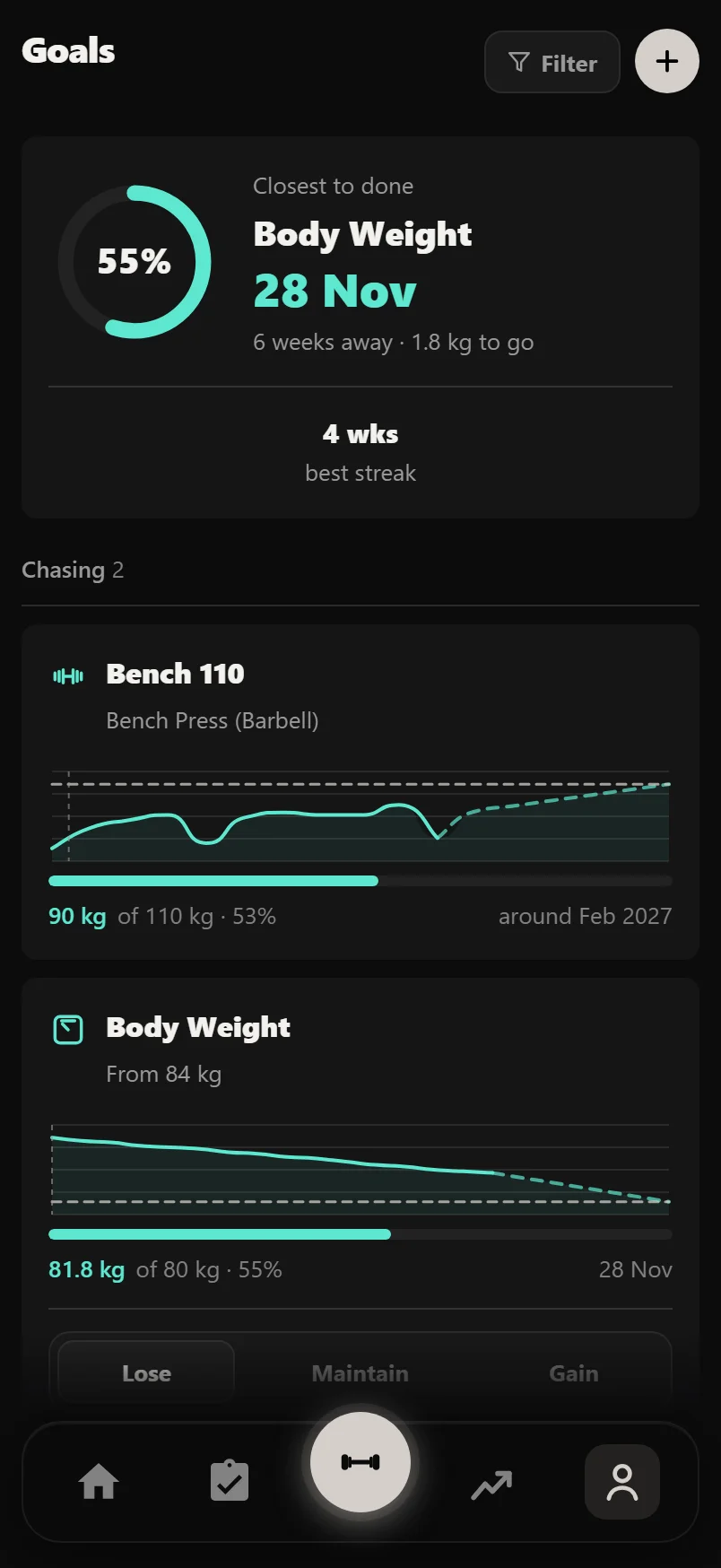
A target works out when you should get there. Durata draws a line through your readings, like your best estimated 1RM each session or your weigh-ins, and finds where it meets the target. The card shows the readings, the line carried on as a dashed line, and the target.
With only a few readings, the date says "around". If the line is flat, the card says so rather than making a date up.
Target date is optional. Leave it blank and the card just tracks the trend. Give it a date and the card tells you how you are doing against it: AHEAD, ON PACE or BEHIND, with how many days early or late. A goal that has stopped moving reads STALLED, date or no date.
Goals opens on the target due to land soonest, with its date and a ring showing how far along it is.
Habits and streaks
A habit card shows this period's count, such as "3 of 4 this week", and a row of bars, one for each past period, filled when you hit it.
Under the bars is your streak: how many periods in a row you have hit it, such as "5 weeks running". The period you are in now can't break a streak. Monday morning doesn't wipe out a run of good weeks because this week has only just started.
Periods are calendar ones: this week starts on Monday, this month on the 1st.
Body weight and body fat goals
Body weight and body fat goals measure from a starting point. Starting weight (or Starting body fat) is filled in from your latest reading. Type your own if you want to count from somewhere else.
A body weight goal also has a Goal direction: Lose, Maintain or Gain.
If you haven't set nutrition targets yet, the goal's card offers Set Targets From This Goal. It opens your nutrition targets already pointing the right way, dated to the goal.
Starting a fat loss program from Discover offers Set a Target as it starts: type a body weight and Set Goal links the goal to the plan, or tap Skip.
Reaching a goal, and goals on Home
When you reach a target, the card turns gold. It shows the date you got there, how long it took and how far you came, with Share This for a picture to send.
Turn on Show on Home in Edit Goal to put a goal on your Home screen. Home shows up to three this way.
Under your goals, Worth chasing suggests a goal or two from your own training. Tap one and New Goal opens with the numbers filled in. Nothing is saved until you tap Add Goal.
Common questions
How do I set a goal in Durata?
Open the You tab, then Goals, and tap +. Pick a goal type, fill in the target (and the exercise, for a lift goal), and tap Add Goal. Durata keeps the score from what you log.
How does Durata work out when I'll reach my goal?
It draws a line through your readings, such as your best estimated 1RM each session or your weigh-ins, and finds where it meets the target. With few readings the date says "around", and a flat trend says so instead of giving a date.
What do AHEAD, ON PACE and BEHIND mean?
They compare the forecast date with the target date you set. They only show when a goal has a target date. STALLED shows on any goal that has stopped moving.
Why does my goal say "around" before its date?
There was not enough steady history to fit a reliable line, so it used a simpler estimate. Keep logging and it firms up.
Why does my goal show no date?
Durata does not trust one yet. A goal with one reading, or one that has not moved, shows how far it has left instead of a made-up date.
What is the difference between a target and a habit?
A target is a level you reach once, like a 140 kg squat. A habit is a count you repeat each week, month or year, like four workouts a week. Habits keep a streak and never move to Achieved.
Does a week in progress break my streak?
No. The streak only counts periods that have ended, so the week you are in can't break it.
How many goals can I have?
Up to 10 at once. Archive a goal to take it off the list, and up to three can show on Home.
Are goals part of Pro?
No. Goals are free.
Put it into practice
Durata is free to use — 50 proven programs, automatic progression, rest timers and PR tracking, all on your phone.