


Getting started with Durata
Durata is a gym log and plan for iPhone and Android. You log your sets in the gym, the app works out what to lift next, and everything syncs to your account so your history is never lost.
This guide takes you from a fresh install to your first look around: signing in, your first launch, Home and the tabs, and bringing your history from another app. It takes about five minutes.
Last reviewed 2026-10-26 · matches app v1.1.1.105
Install the app and create your account
Durata is on the App Store and Google Play. It is free, and Pro is an optional upgrade you buy in the app. Accounts are made in the phone app; the web dashboard signs in to an account you already have.
There are no passwords. Enter your email, and Durata emails you a 6-digit code. Type or paste it and it goes through on the sixth digit.
After your first sign-in, a Before You Train sheet asks you to accept Durata's health and liability terms: Durata is a training log, not medical advice, and you train at your own risk. It shows once, on all your devices, and again only if the terms change, with a summary of what changed.
- Install Durata from the App Store or Google Play.
- Open it and enter your email address.
- Type the 6-digit code from your email. It goes through on the sixth digit.
- Accept the terms on the Before You Train sheet.
- You're in. Everything you log syncs to your account.
Your first launch
A new account opens on Home with a First Session card. Start Your First Workout opens the exercise picker so you can add your first lift. Browse Programs opens the 50 plans in Discover, and Import History brings your history from another app.
Under it, two chart previews say "After 1 session". Log a workout or finish an import and your own board replaces them.
A quick tour of Home
Home is a board of widgets that fills up as you train. A widget with nothing to show is not on the board, so a new account starts small and widgets join as their data arrives.
At the top are the date and your sync status, and the pencil that edits the board. Under them, the This Week strip shows your week: green for done, today ringed, amber for a planned session you missed. Tap a day to open what it holds. If a workout is running, a banner takes you back to it.
Up Next is the widget you will use most: today's planned session. Tap it to preview the session, with Start Workout at the foot. Press and hold any widget to move, resize, remove or add widgets.
The Home widgets guide covers every widget and the editor.
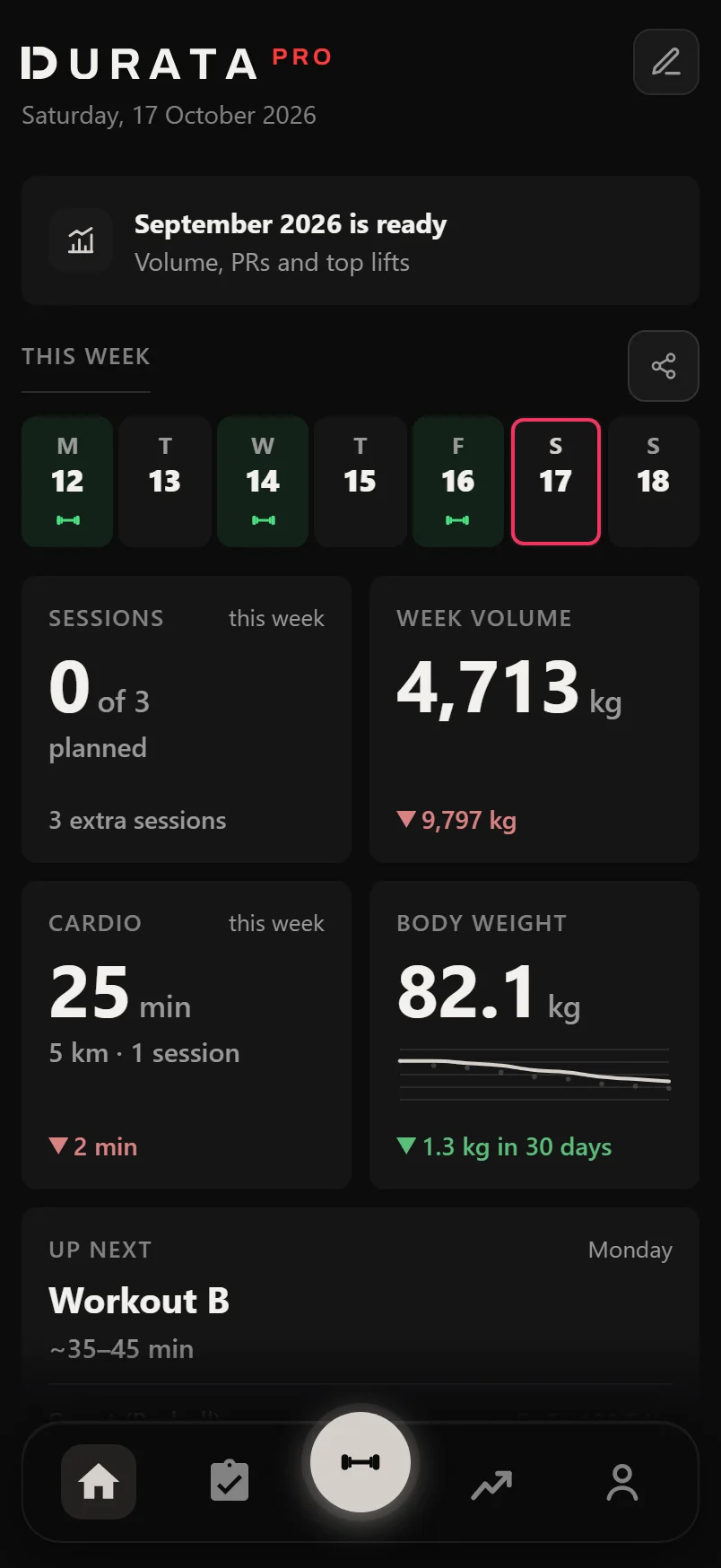
The line beside the date shows your sync status, so you can see your training is saved.
Bring your training history with you
Import History on a new account, or Settings, Data & Export, Import, takes a CSV file from Strong, Hevy or Loadline, or a Durata backup. With Hevy Pro you can connect an API key instead and bring your routines too (see Switching from Hevy).
Importing twice never makes duplicates: new sessions are added, changed ones updated, the same ones skipped. Exercise names are matched to Durata's 560 exercises even when the wording differs, notes come with them, and anything that does not match becomes a custom exercise.
Hevy files say their unit, and so do most Strong files. If a file does not, Durata asks Which Unit Is This File In?
When the import is done, the Instant Insights reel plays your history back. Its last screen offers to rebuild the workouts you repeated as sessions, built from your latest weights, and group them into a weekly plan with a start date.
Getting around the app
The bar at the bottom has five tabs: Home, Training (your plans and sessions, Discover and the exercise list), Workout (the barbell in the middle, where you log), Progress (Review, History, Strength and Workload) and You.
You is about you rather than your training. The top card is your profile: your sessions, volume and how long you have trained, and Play Your Story once you have some history. Tap the card for About You, where you set your name, or tap the round photo to add a picture. Under it are Body Metrics, Cardio, Nutrition, Gallery and Goals, each with a line on how it is going, and Your Cards once you have earned some. Settings is the gear at the top right.
Durata works offline and syncs when you are back online, so a gym with no signal never costs you a set.
A ring spins round the barbell Workout button while Durata is saving to your account.
Common questions
Do I need a password?
No. You sign in with your email and a 6-digit code emailed to you each time.
Can I sign up on the website?
No. Accounts are made in the phone app. The web dashboard signs in to an account you already have.
Do I have to accept anything before I train?
Yes. A Before You Train sheet shows once after your first sign-in, with Durata's health and liability terms. It only shows again if the terms change.
Is Durata free?
Yes. Logging, every plan in Discover with its progression, history, records, sync, backup and export are free, with no limit on workouts. Pro is an optional upgrade.
Will importing my Strong or Hevy history make duplicates?
No. Sessions you already have are skipped and changed ones updated, so you can import the same file twice.
Does Durata work without signal at the gym?
Yes. Everything works offline and syncs when you are back online.
Put it into practice
Durata is free to use — 50 proven programs, automatic progression, rest timers and PR tracking, all on your phone.