


Coming back after a break
Illness, holidays, work: everyone has gaps. Picking a plan up exactly where you left it after a month off usually means a first session that is too heavy.
Durata notices the gap and asks what you want to do. You can carry on as if nothing happened, or ease back in with lighter weights and choose the week to restart from. Either way it is one tap, and easing back in can be undone.
Last reviewed 2026-10-20 · matches app v1.1.1.105
Welcome Back
When your running plan's last logged session is 14 days or more behind you, Home's Up Next card shows Welcome Back: "Your plan is where you left it: Week 3 of 12."
Carry On keeps everything as it was and the row goes away until there is another gap. Ease Back In opens the sheet below.
It only shows when there is something to change: a plan with no weights to lower and no week to choose doesn't ask.
The Ease Back In sheet
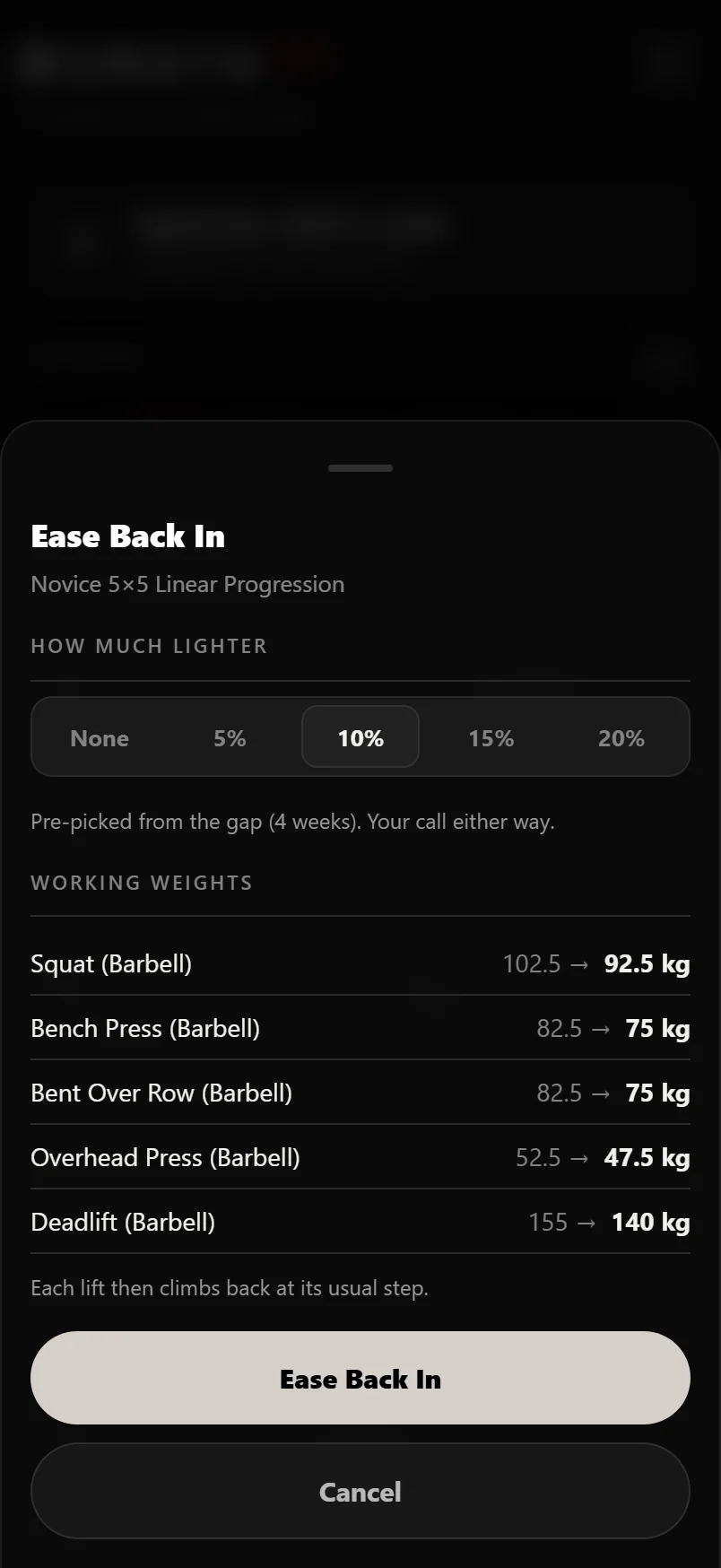
How much lighter offers None, 5%, 10%, 15% or 20%. Durata picks one from how long you were away: 5% for a couple of weeks, 10% from three weeks, 15% from six weeks. It says what it picked from, such as "Pre-picked from the gap (4 weeks)", and the choice is yours.
Under it, each lift shows its weight now and what it will be, such as "102.5 → 92.5 kg". Working weights and training maxes are both listed when the plan has them. Weights are rounded to your weight step and never go below the empty bar.
On a plan with weeks, Where to pick up lets you stay on the week you were on, restart that week from its first session, or go back to Week 1.
Tap Ease Back In to apply it. Each lift then climbs back at its usual step, so the weights come back up within a few sessions.
Undoing it
Once applied, the Welcome Back row says what changed, such as "Weights lowered on 5 lifts, picking up at Week 3", with Undo. Undo puts every weight and the week back as they were.
Undo stays until you log your next session in the plan. After that, the lighter weights are your new starting point.
Resuming a paused plan
If you paused the plan yourself, Resume asks the same question when the gap is two weeks or more, with the same sheet, which lists your training maxes too. After a shorter pause, Resume works as usual: a plan run off training maxes asks you to confirm them first.
Common questions
How long a break before Durata offers to lower my weights?
14 days since your last logged session in the plan. Welcome Back then shows on Home's Up Next card.
How much lighter does Durata go?
You choose None, 5%, 10%, 15% or 20%. It pre-picks 5% for a couple of weeks off, 10% from three weeks and 15% from six weeks.
Can I undo Ease Back In?
Yes, until you log your next session in the plan. Undo on Home's Welcome Back row puts the weights and the week back.
Do I lose my progress if I ease back in?
No. Your history and records stay. Only the next targets come down, and each lift climbs back at its usual step.
Put it into practice
Durata is free to use — 50 proven programs, automatic progression, rest timers and PR tracking, all on your phone.