


Cardio and HIIT
Durata tracks cardio without a separate diary. Rides, runs and rows you log in a workout, and the ones your phone or watch records, all land in one place, counted once.
This guide covers the Cardio screen, the cardio timer in a workout, and HIIT: how to build a block of rounds and how it runs itself.
Last reviewed 2026-10-20 · matches app v1.1.1.105
Cardio: tracked, not typed
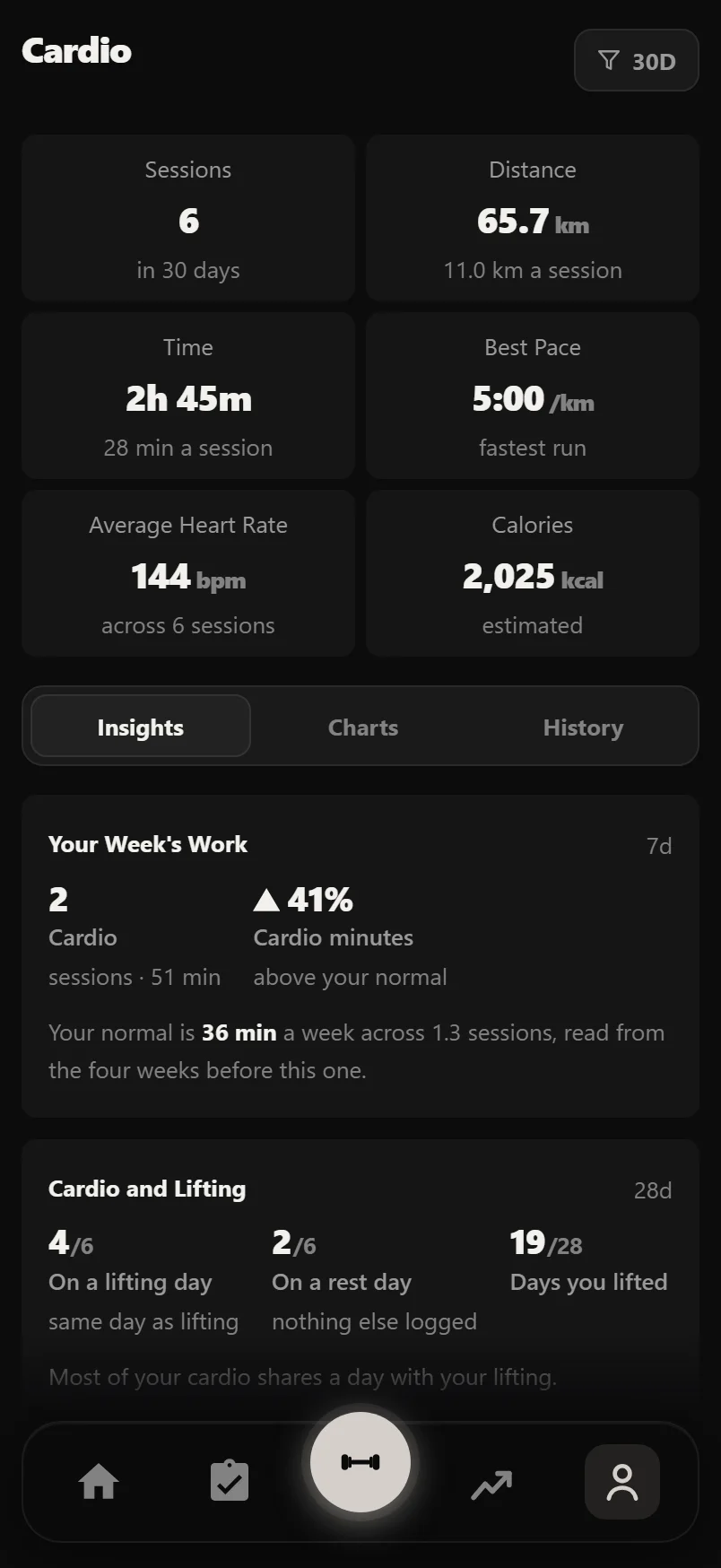
Open You, then Cardio, and your sessions are already there: cardio logged in a workout, plus runs, rides and swims from other apps through Apple Health or Health Connect. There is no separate cardio diary to keep.
A ride logged in a workout counts once: here, on Home and towards a cardio goal. Edit the set in the workout and Cardio follows.
Six tiles sum up the range you pick: Sessions, Distance, Time, Best Pace, Average Heart Rate and Calories. Each one opens the chart or list it comes from. The range button at the top right switches between 7 days, 30 days, 90 days, a year and all time, and is remembered.
Cardio has three tabs. Insights has Your Week's Work (the last 7 days), Cardio and Lifting (28 days), and Same Effort, More Speed (16 weeks); each card names its own window, so the range button does not change them. Charts has Distance, Pace (running), Heart Rate, and Duration with each bar coloured by its heart rate zone (grey with no heart rate). History lists your Activities and your Sessions.
Distance draws a dashed line at your average session when the range holds one kind of cardio; with several kinds, each gets its own colour and its own average. Pace and heart rate draw a 7-session average over the raw line. A small mark shows your fastest run.
Tap a session to open it. You can correct its distance, time, heart rate, elevation and notes, and turn Counted off for that session. A session logged in a workout opens the workout instead. With a heart rate, Durata shows the training zone and estimates calories.
Tap an activity in History for its records: longest distance and best pace where there is a distance, and longest session, total time and last done for all of them.
Each activity has a Counted switch. Turn it off and that activity stops counting towards your totals, charts and goals until you turn it back on.
Every chart has an expand button for a full-screen view, with your average, best and worst along the bottom.
Running the timer in a workout
Add a cardio exercise to a workout and its rows have distance, time and a rest cell instead of weight and reps. Tap START and the timer runs the set: a planned time counts down with a ring and a Pause button, and no time set means a stopwatch that counts up.
Either way, Finish logs the time you actually did. Stop a planned 30:00 ride at 20:00 and 20:00 is logged, the set ticks off and its rest starts. Cancel, beside it, drops the set without logging it.
When every set is done, the button reads LOG ANOTHER: one tap adds a round and starts it.
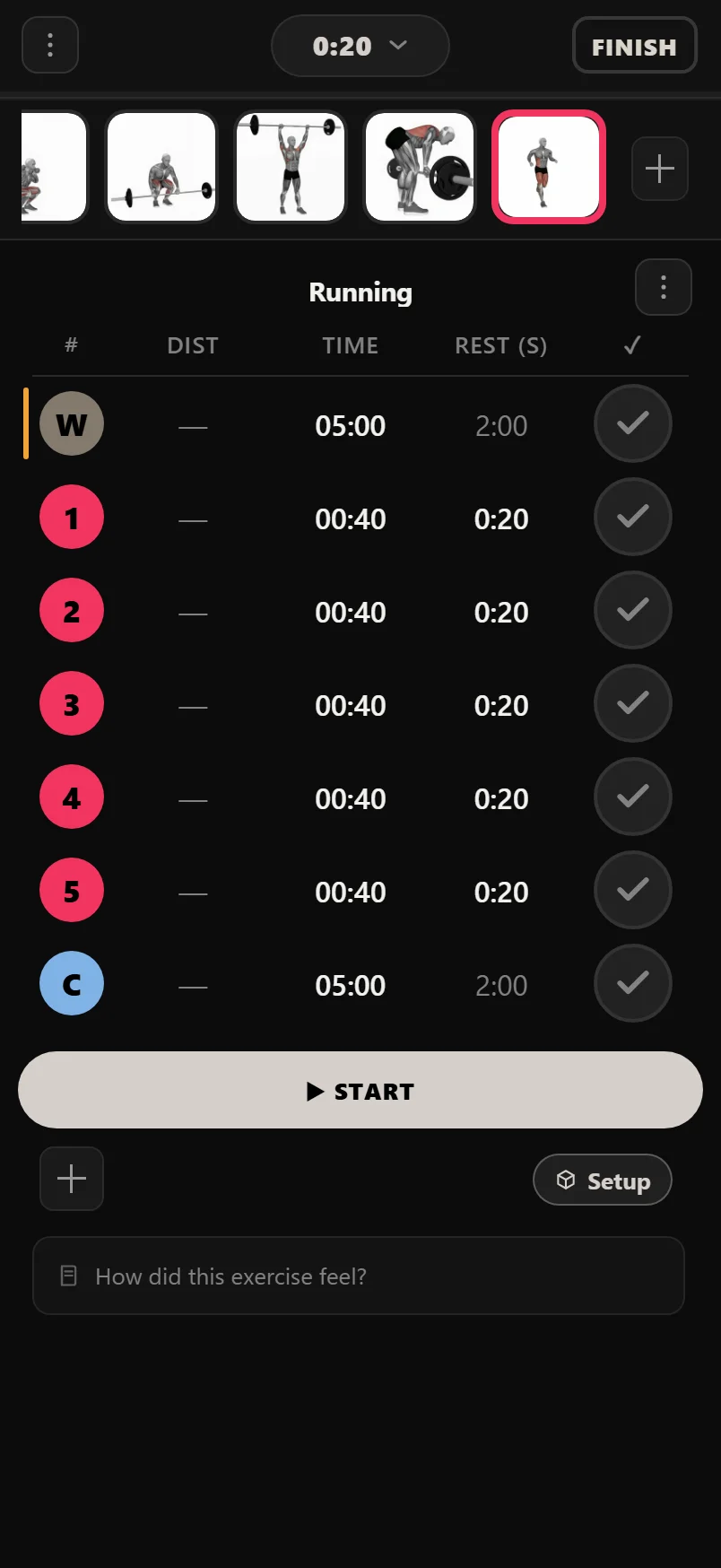
Type seconds into the rest cell and it formats itself, so 90 becomes 1:30. Set it to 0 and the next round starts straight away.
You can type the time by hand instead. It fills from the right, so 2000 becomes 20:00 and 130 becomes 1:30.
Tap a cardio set's number to make it Steady or HIIT. Swipe a row left to delete it.
During the three-second GET READY count, the big button is Cancel, because nothing has been done yet.
HIIT that runs itself
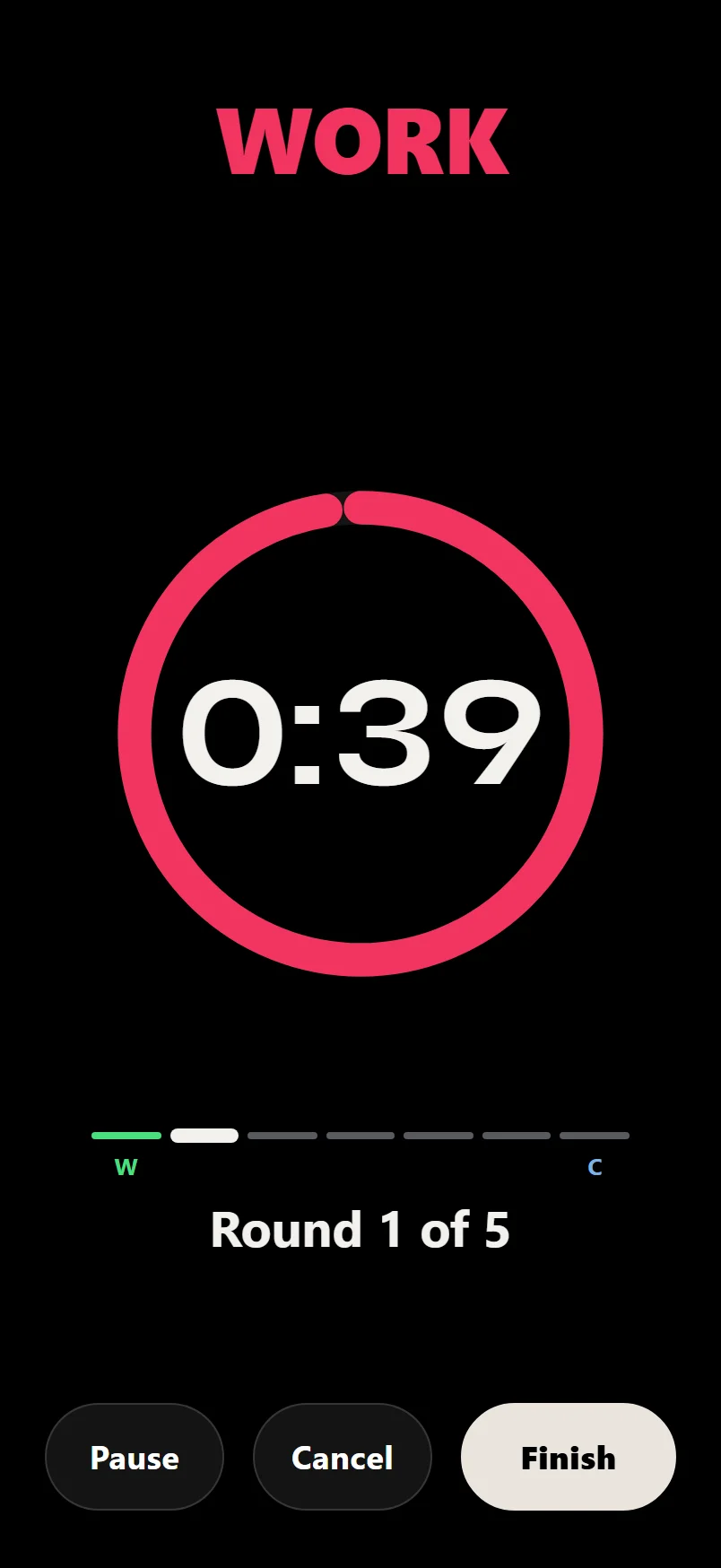
Mark sets as HIIT and the logger runs them as intervals: each set's time is the work and its rest is the recovery, and the rounds run on by themselves, with the round and WORK or REST shown large. HIIT work has a red ring; steady sets stay white. Nothing pops up mid-block; records show at the end.
To build a block in one go, tap the number of a HIIT set to open its sheet. Under HIIT are Rounds, Work and Rest. Type how many rounds (up to 30), the work time and the rest in seconds, and the set and the HIIT sets after it become that many rounds, each with that work and rest. It works the same in a workout and in the planner, so a plan can carry the whole block.
HIIT blocks in Durata's plans come with a 5-minute easy warm up and cool down. The warm up runs straight into round one, and the cool down starts on its own after the last round.
With many rounds, the START button stays at the foot of the screen while the rounds scroll past.
Common questions
Can I log a cardio session by hand?
There is no separate cardio diary. Sessions come from cardio logged in your workouts and from Apple Health or Health Connect. Tap a synced session to correct its distance, time, heart rate, elevation and notes.
What is the difference between Steady and HIIT sets?
Tap a cardio set's number to choose. HIIT rounds run through work and rest on their own; a Steady set is one continuous effort.
Can I use miles instead of kilometres?
Yes. Distances follow the km or miles setting, and body weight your kg or lbs setting.
How do I set up a HIIT workout?
Add a cardio exercise, tap a set's number and choose HIIT. Fill in Rounds, Work and Rest, and that set becomes the whole block. Tap START and the rounds run on their own, work then rest.
Does cardio from my watch count?
Yes. Runs, rides and swims that reach Apple Health or Health Connect show on the Cardio screen and count towards your totals and cardio goals. Turn Counted off on an activity to leave it out.
Put it into practice
Durata is free to use — 50 proven programs, automatic progression, rest timers and PR tracking, all on your phone.