


Test Day and Meet Day
Test Day works you up to a rep max on the lifts you choose: a heavy single, triple, five or ten. Meet Day runs a powerlifting meet, or a mock one in the gym: three attempts a lift, in order, with a running total. Both are free, and both work out the warm-ups and the next weight for you.
Both live in the Training tab's Locker, under Test and Meet, below your plans and sessions.
Last reviewed 2026-11-21 · matches app v1.2
Setting up a Test Day
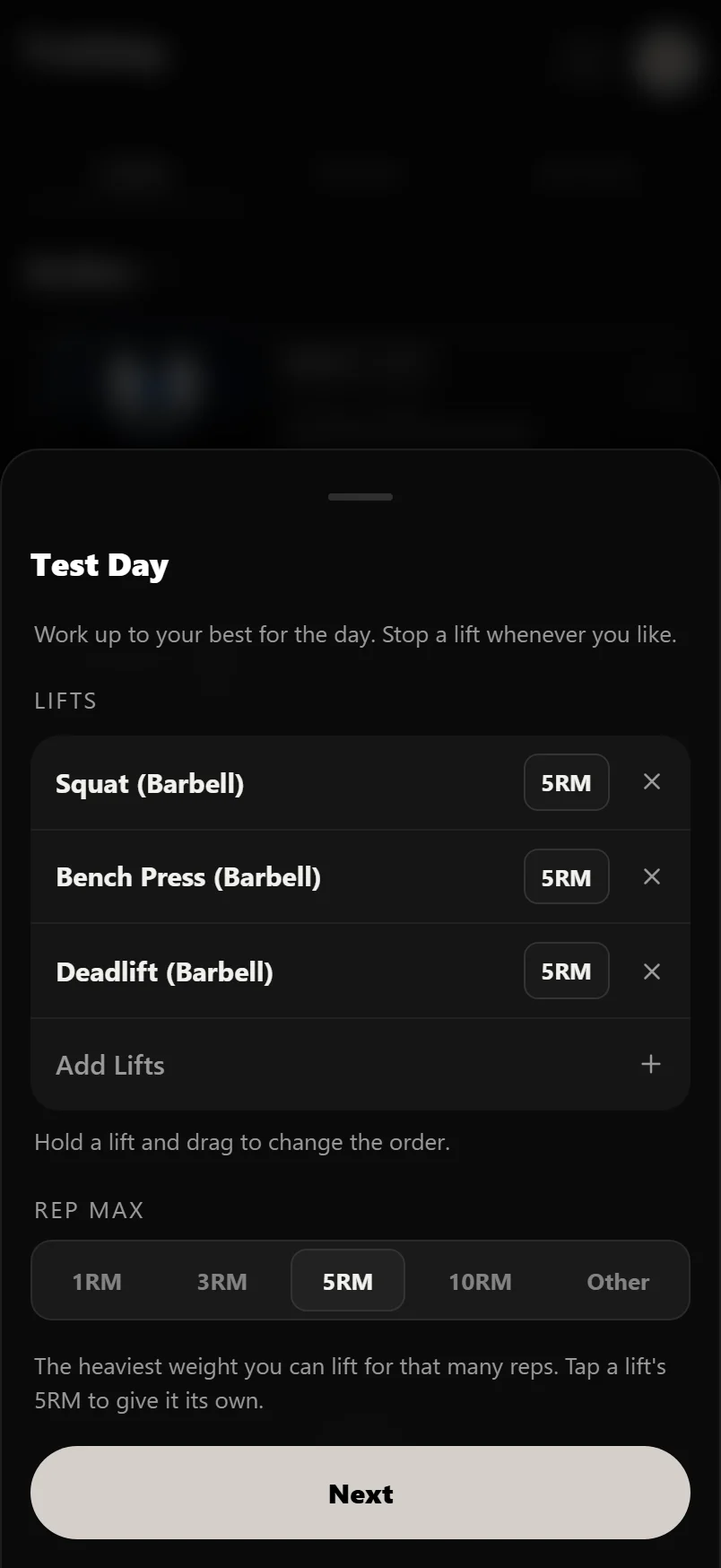
Tap Test Day. The first time, it lists the squat, bench press and deadlift. After that it remembers your last set-up. Add Lifts opens the exercise picker, so any lift can be tested, and the X removes one. Hold a lift and drag it to change the order.
Rep Max picks what you are testing: 1RM, 3RM, 5RM, 10RM or Other, which takes any number up to 20. It applies to every lift. Tap one lift's rep max to give that lift its own.
Next opens Start From, where each lift gets the number it starts from. Pick your best estimated max from the last 12 weeks, the last 12 months or all time, each showing the set it came from, or type Your Own rep max. Each row shows the first top set that number gives. With no history and no number, start light and build up. Then tap Start Test Day.
Working up in the logger
The workout opens with warm-up sets already in place: the empty bar on barbell lifts, then a short ladder to your first top set, with longer rest before the heavy sets. A line under each lift says what you are testing and your best for that many reps in the last 12 months.
After each top set you make, a card says how it compares with your best and offers the next jump: Small, Steady or Big. If you log RPE or RIR, the card highlights the jump that fits. On barbell lifts it also says what to add to each side.
If a set comes up short, or you miss it (hold the set's tick to mark a missed rep), the card offers Try Again, Drop a Little or Stop. Once a set is RPE 10, RIR 0 or failed, it offers no bigger jump, just Go Heavier Anyway if you want one more try. Stop a lift whenever you like. Moving on to the next lift closes the one you left, and Reopen brings it back.
Setting up a Meet Day
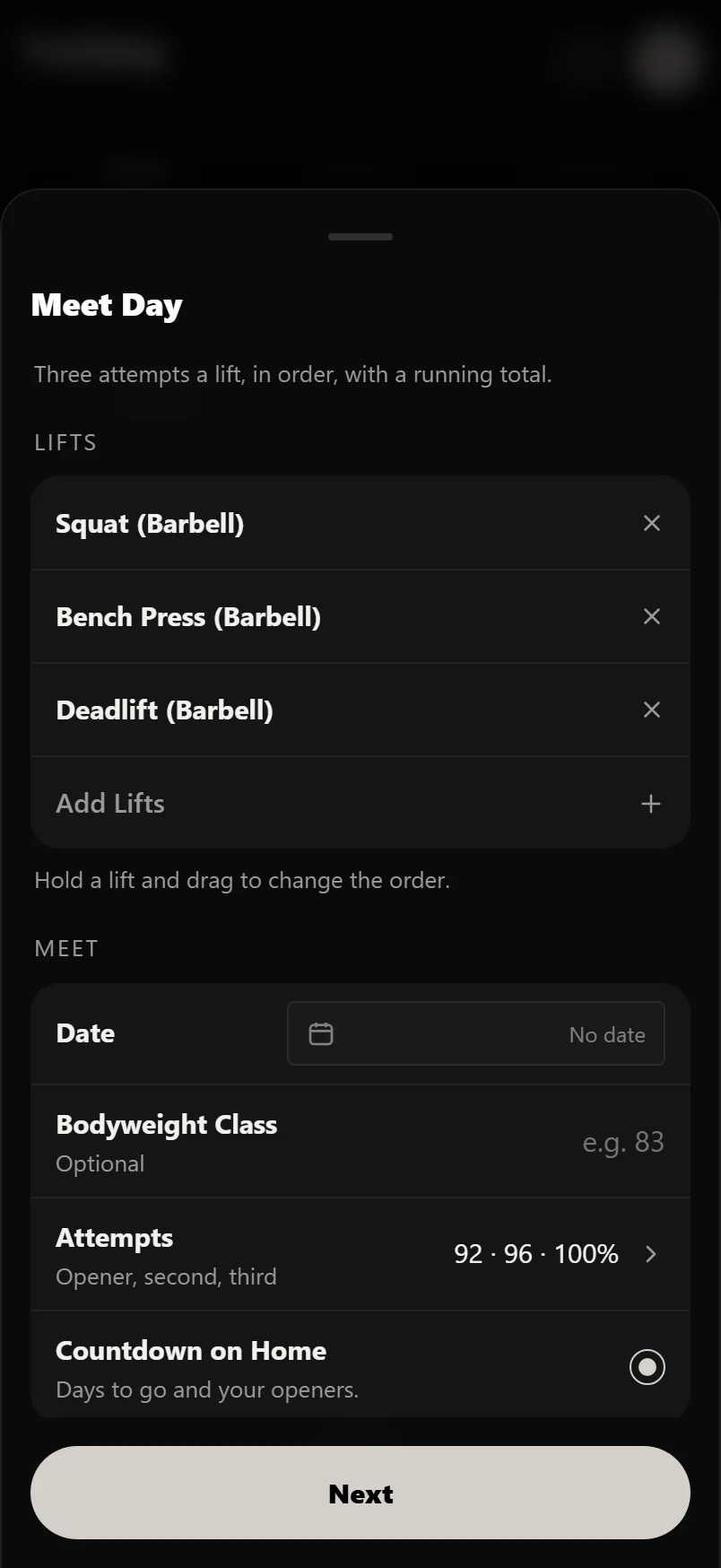
Tap Meet Day. It starts with the squat, bench press and deadlift, and you can add, remove and reorder lifts the same way. Set the meet's Date, today or later, and an optional Bodyweight Class in kg.
Attempts sets your opener, second and third as percentages of your goal: 92, 96 and 100% unless you change them. Each must be between 50 and 110% and heavier than the one before. The same setting is in Settings, Workout, Test Day and Meet.
Next opens Goals, which works like Start From: pick an estimated max or type Your Own Goal, and each lift shows the three attempts that goal gives, rounded to your plates. Save Meet keeps it for the day. Countdown on Home, on unless you turn it off, puts the days to go and your openers on Home.
On the day
On the meet's date the Workout tab shows a Meet Day card with Start Meet Day. You can also start a saved meet early from the Locker, which makes it a mock meet.
Each lift has warm-ups to the opener, then three attempt rows with five minutes' rest. After a good lift the card offers Low, Target or High for the next attempt, never below the weight you just made. After a miss the weight never drops: Repeat or Go Up. A running Total so far and the total you are on course for stay in view. Three misses on a lift means no total.
Tapping the countdown card on Home opens the Weigh-In Card: your latest bodyweight from Body against your class, the class, and each opener with its rack height where you have saved one.
Results and share cards
Test Day Complete lists each lift's best for the reps, what your best was before and when, whether it is a new rep max or a new 12 month best, its estimated one rep max, and every set with the misses marked.
Meet Day Complete shows a scoresheet: each attempt, the best of each lift and the total, with meet and all-time PRs marked, then a review of which attempts you made. DOTS, a score that weighs the total against bodyweight, shows when you have logged your bodyweight, using the sex set in Settings.
Both save as a normal workout with a TEST DAY or MEET badge in History, and exercise charts ring that day's point. Saving adds their share cards to Your Cards: a rep max result for Test Day, a meet result and total for Meet Day. A discarded run adds none.
Common questions
Is Test Day or Meet Day part of Pro?
No. Both are free for every account.
Which rep maxes can I test?
1RM, 3RM, 5RM, 10RM, or Other for any number up to 20. Each lift can have its own.
Do I have to run squat, bench and deadlift?
No. They are the starting list, but Add Lifts takes any exercise in the library, for both Test Day and Meet Day.
Can I run a mock meet before the real one?
Yes. Save the meet, then start it from the Locker before its date. It runs the same attempts and total.
How are my meet attempts worked out?
From the goal you set for each lift: 92, 96 and 100% of it by default, rounded to your plates, each at least one step heavier than the last. Change the percentages in the meet's Attempts row or in Settings, Workout.
What happens to a saved meet after its date?
Once the date has passed it is cleared from the Locker and Home. A meet you logged stays in History.
Put it into practice
Durata is free to use — 84 proven programs, automatic progression, rest timers and PR tracking, all on your phone.