


Strength levels, balance and recovery
Charts show what you lifted. This guide is about the cards that go a step further and tell you what it means: how strong you are for your body weight, whether you train push and pull evenly, and whether it is time to ease off.
Each one is worked out from what you log, nothing else. Some are free and some are part of Pro. Each section says which.
Last reviewed 2026-10-20 · matches app v1.1.1.105
Strength Index and DOTS (free)
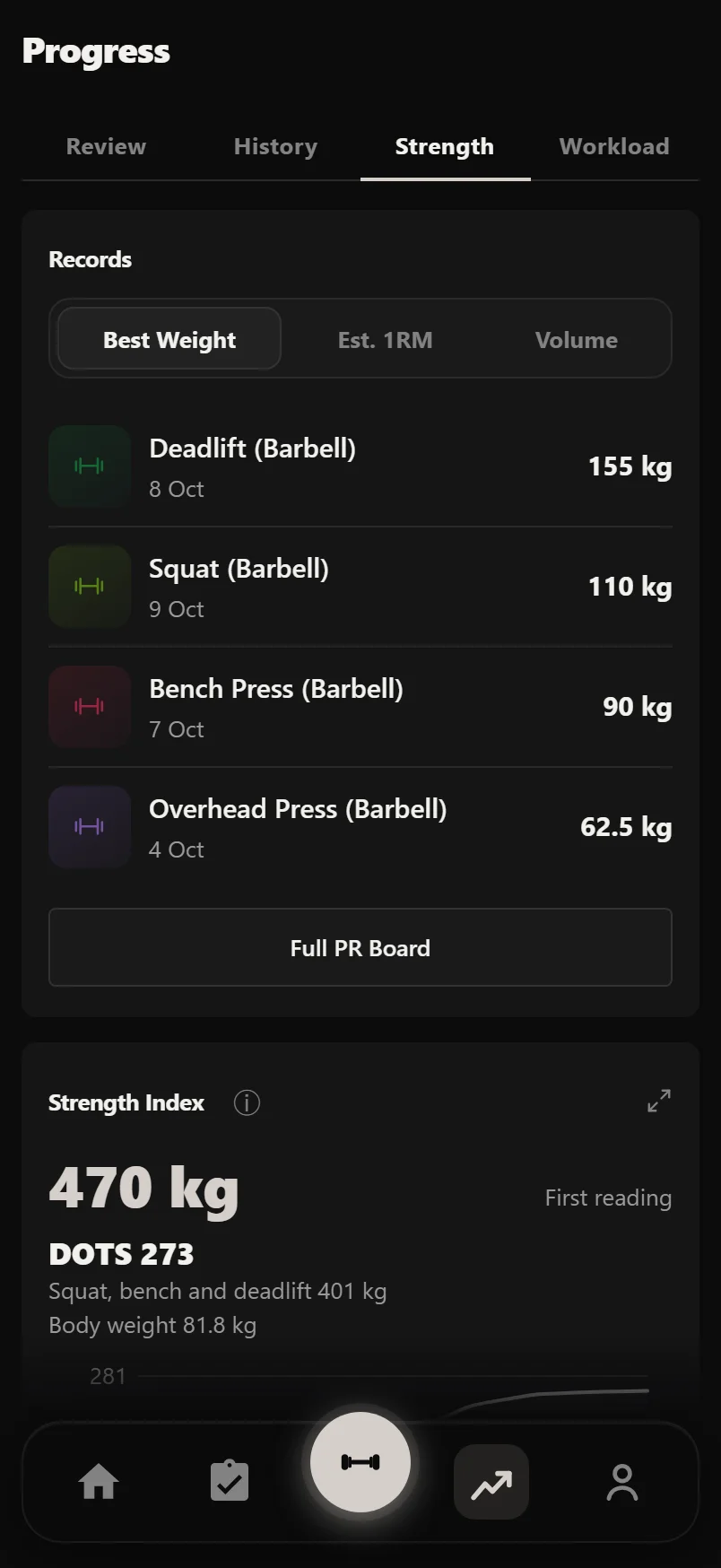
Strength Index is on Progress, Strength. It adds up your best estimated 1RM on squat, bench press, deadlift and overhead press. Beside it is how much it has gone up in the last 90 days, or No Change if none of the four has moved. Until your first lifts are 90 days old it says First reading.
If you have logged squat, bench and deadlift and a body weight, you also get a DOTS score. DOTS weighs your squat, bench and deadlift total against your body weight, so lifters of different sizes can be compared. A chart shows it over time.
The four lifts are listed under the index. Tap one to open its estimated 1RM chart.
Strength needs five logged workouts before it shows anything.
Your level on each lift (Pro)
With Pro, each of the four lifts shows your level: Beginner, Novice, Intermediate, Advanced or Elite. The level comes from your estimated 1RM divided by your body weight, against the Symmetric Strength standards.
The row shows the ratio, such as "1.52× BW", and how much more you need for the next level, such as "Advanced in 18 kg". A bar under it has the five levels, with yours lit.
The standards are set for men by default. Women's standards are 15% lower. Set yours under Sex in Settings, About You.
You need a logged body weight for this. Without one, the card offers Log Weight.
Compare These, at the foot of the card, puts the four lifts on one chart to see how they have moved against each other. Compare is part of Pro too.
Muscle Balance (Pro)
Muscle Balance is on Progress, Strength, under Near PRs. It looks at the last 4 weeks and gives two ratios.
Push to Pull compares your pressing work (chest, shoulders, triceps) with your pulling work (back and biceps). Face pulls and other pulls aimed at the shoulders count as pull. Between 0.8 and 1.2 to 1 reads Balanced. Above that it reads Push-dominant and suggests more rows and pull-ups. Below it reads Pull-dominant.
Quads to Hamstrings compares your quad work with your hamstring work. Up to 2 to 1 is Balanced. Above that it reads Quad-dominant and suggests Romanian deadlifts and leg curls.
Both use volume, weight times reps. If one side has nothing at all, the row says which lifts would give it a ratio, such as "No hamstring lifts".
Tap a row to open Sets by Muscle on the Workload tab and see each muscle on its own.
Load & Recovery and the deload checks (Pro)
Load & Recovery is on Progress, Workload. Its headline is one verdict: Training Load Healthy, Consider a Deload Soon, or Deload Recommended.
The verdict comes from four checks, each shown with its reading. Volume compares your last 7 days with your average week over the 4 weeks before, and trips above 130%. Effort trips when RPE or RIR has been rising across your recent sessions; it only shows if you track effort. Sessions trips at more than 5 a week over the last 2 weeks. Days in a row trips at 7 days of training without a rest day.
Two checks tripped gives Consider a Deload Soon, and three or more gives Deload Recommended. One on its own is not enough, because one busy week is normal.
Under the checks is a recovery score from 0 to 100, where higher means fresher. 70 and over reads Well Recovered, 40 to 69 Moderately Fatigued, and under 40 High Fatigue. It takes in your recent volume, effort, how often you train, and sleep if you sync it.
Two charts follow: your volume against your normal week, marked Below 0.8×, In line or Above 1.3×, and your recovery score over the last 12 weeks.
These need history. Until there are at least 3 of the last 4 weeks with training in them, a check says how far along it is, such as "2 of 3 weeks", and the card says there isn't enough to compare against yet.
Above 1.3× is not a warning in itself. It means more than your recent normal, which is what a new program or an extra accessory does. The verdict only changes when several checks agree.
The Recovery tile on Home shows the same score and taps through to this card.
Sleep and food against your training (Pro)
Two more cards sit under Load & Recovery when you have the data. If you sync sleep from Apple Health or Health Connect, Sleep & Performance compares your training after a good night with after a short one. If you log food, Fuel & Training sets each week's eating against your target. Both are part of Pro.
Session fatigue (free)
Every workout you finish gets a fatigue reading. Open the session in Progress, History and look under How It Went. It reads in words and a percentage, such as "Fatigue Building 58%", from Fresh through Settling, Working, Building and High to Peak.
It is worked out from four signals across your working sets: RPE Drift (sets feeling harder as you go), Rest Drift (rests getting longer), Rep Drop-off (reps falling at the same weight) and Volume Pace. Each one has a bar.
A footnote says how many of the four it could read, such as "Read from 2 of 4 signals". Log RPE and use the rest timer, and it has more to go on.
Common questions
What is the Strength Index in Durata?
It is your best estimated 1RM on squat, bench press, deadlift and overhead press, added up, with how much it has gone up in the last 90 days. You will find it, free, on Progress, Strength.
How does Durata decide if I'm Intermediate or Advanced?
It divides your estimated 1RM on each lift by your body weight and compares that with the Symmetric Strength standards, which run from Beginner to Elite. Women's standards are 15% lower. Seeing your level is part of Pro and needs a logged body weight.
What does Push-dominant mean?
Over the last 4 weeks you did more pressing volume than pulling volume, more than 1.2 to 1. Muscle Balance, part of Pro, suggests adding rows and pull-ups.
When does Durata tell me to deload?
Load & Recovery runs four checks: volume against your normal week, rising effort, sessions in the last 2 weeks and days in a row without rest. Two tripped gives Consider a Deload Soon, three or more gives Deload Recommended. Load & Recovery is part of Pro.
What is the recovery score?
A number from 0 to 100, higher meaning fresher, from your recent volume, effort, how often you train and your sleep if you sync it. 70 and over reads Well Recovered and under 40 High Fatigue.
Why does my session say it read only 2 of 4 signals?
The fatigue reading uses RPE, rest times, reps and volume. A session logged without RPE or without rest times gives it fewer to work with, and the footnote says so.
Put it into practice
Durata is free to use — 50 proven programs, automatic progression, rest timers and PR tracking, all on your phone.