


Workout tools
A workout in Durata comes with the tools you would otherwise reach for another app for: a rest timer, a warmup calculator, a plate calculator and a rep-max calculator.
All of them sit inside the workout, one tap from the set you are on. This guide goes through each one.
Last reviewed 2026-10-20 · matches app v1.1.1.105
The rest timer
Tick off a set and the rest timer starts on its own. The full-screen view shows the countdown plus what's next: exercise, set number, target weight and reps, with −15s and +15s buttons to nudge the time. Prefer something quieter? In Settings > Rest Timer you can swap it for a floating mini-timer, or a slim bar in the workout header so nothing covers your sets.
You can move between them mid-rest. The X in the full-screen countdown's corner, a tap on the dimmed background, or the phone's Back button puts it back down to the header bar or the mini-timer. Going the other way, tap the mini-timer's face, or the expand button beside FINISH while a header rest runs. The timer never stops for any of this.
Cardio and timed holds (planks, dead hangs, wall sits and anything logged as Time / hold) get a ▶ START countdown instead. That screen has no X, because ending it logs the set, so it stays until you finish or cancel the effort.
Between sets of the same lift the countdown adds a plate line whenever the next set's weight changes. If the weight isn't moving it stays quiet, so straight sets never see it and a Dropset or a pyramid always does.
When the rest comes before a different exercise, a pill under the exercise name shows how to set it up: the plates for the coming lift, or "2 × 17.5 kg" on dumbbells. The weight isn't repeated underneath. Tap the pill and the full Setup sheet opens over the countdown, which keeps running.
You don't need to keep the screen on: when rest ends, Durata fires a notification telling you what's next, even with the phone locked, and its beeps duck your music instead of pausing it. If your phone's alarm volume is too low to hear in a pocket, Durata tells you once and opens the volume slider.
Rest Times, in an exercise's ⋮ menu, lists every set of the lift with its rest. Pick a set, choose a preset or Custom, then Apply to All Sets, or Next Lift to carry on to the next exercise without leaving the sheet. A rest of None skips the timer for that set.
Settings > Rest Timer > Rest by Set Type sets a default per kind of set: Warmups, Dropsets, Backoffs and the rest each get their own row. It only fills in for a set with no rest of its own; anything a program or your own routine prescribes keeps that number, and a rest you set in the logger always wins.
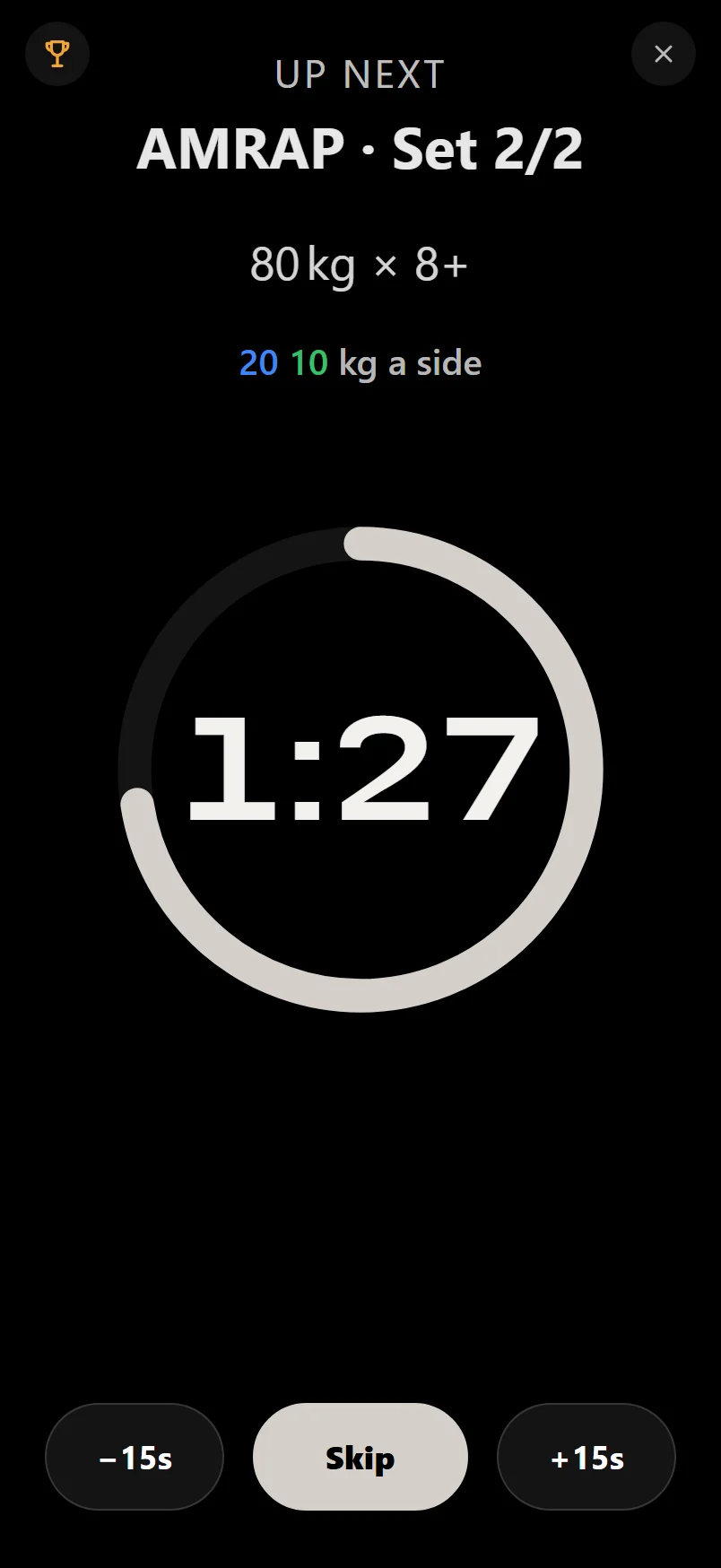
Put the countdown away and walk off the Workout screen and it follows you as the mini-timer, then hands back to the header bar when you return.
While a header rest runs, the tool tray's buttons become −15s, Skip and +15s, so you can adjust or end the rest without opening the countdown.
The warmup calculator
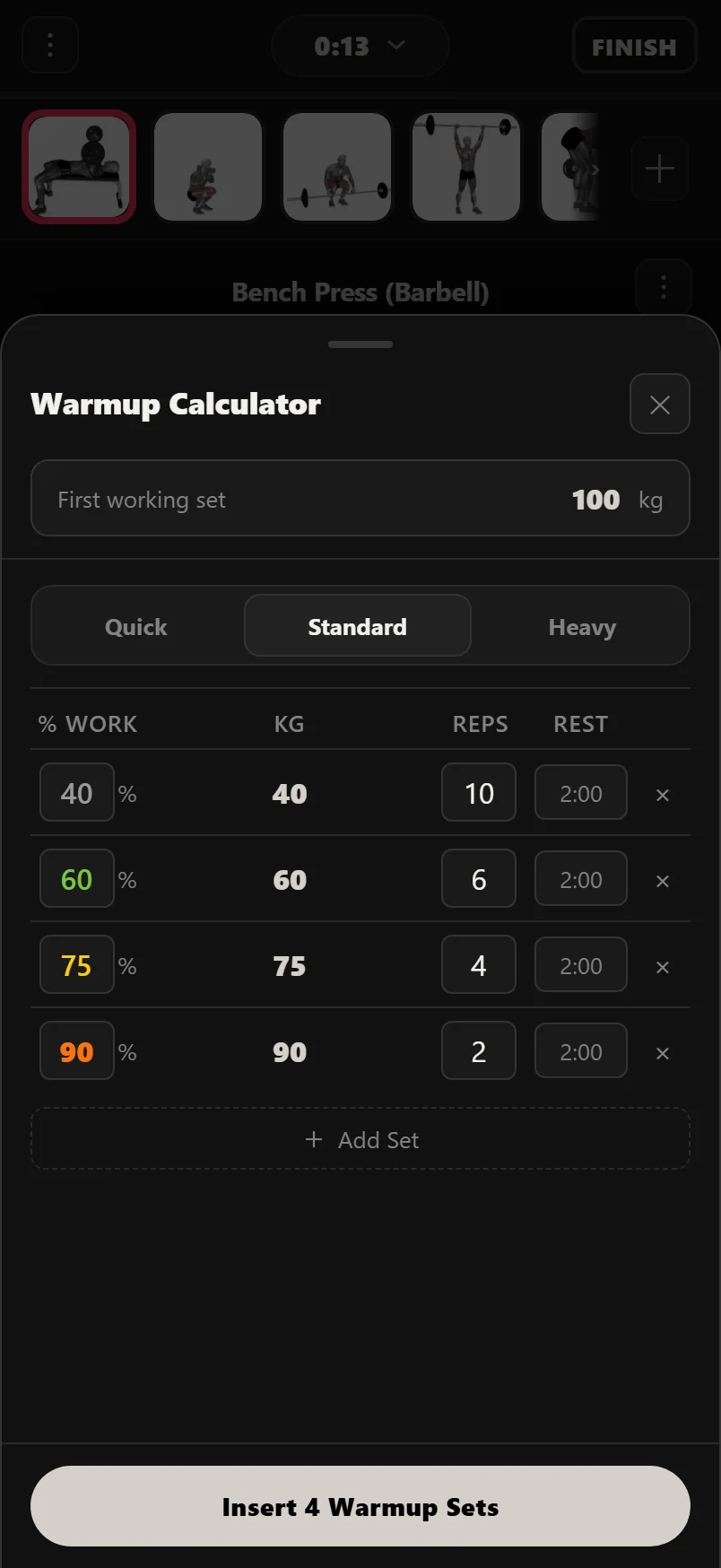
Tap the W button in the bottom bar and enter your first working-set weight; the calculator builds a ramp of warmup sets, each a percentage of that weight with reps and a rest. Leave a rung's rest alone and it reads your Rest by Set Type default for warmups, in muted text to show it's inherited; set a rest on that rung yourself and it turns solid and stays yours. Everything is editable, you can save your own profiles, and one tap inserts the whole ramp into the current exercise. Warmups never go below the empty bar.
When the ramp is done
Once every warmup is ticked off, the ramp folds away so your working sets sit at the top of the card, and leaves a W chip in its place: "2 Warmup Sets · 35–47.5 kg". It tells you how many rungs you climbed and the range, without keeping finished rows in the way. The Setup chip stays on screen.
Tap the chip and the ramp comes back, so a mistyped warmup weight is one tap from being fixed. Tap it again to put them away. Untick a warmup and the rows stay out; the fold only happens when the whole ramp is done.
While the ramp is open, + Add Warmup Set under the last rung adds one more, copying the rung above it, so you can take an extra step on a heavy day without rebuilding the ramp.
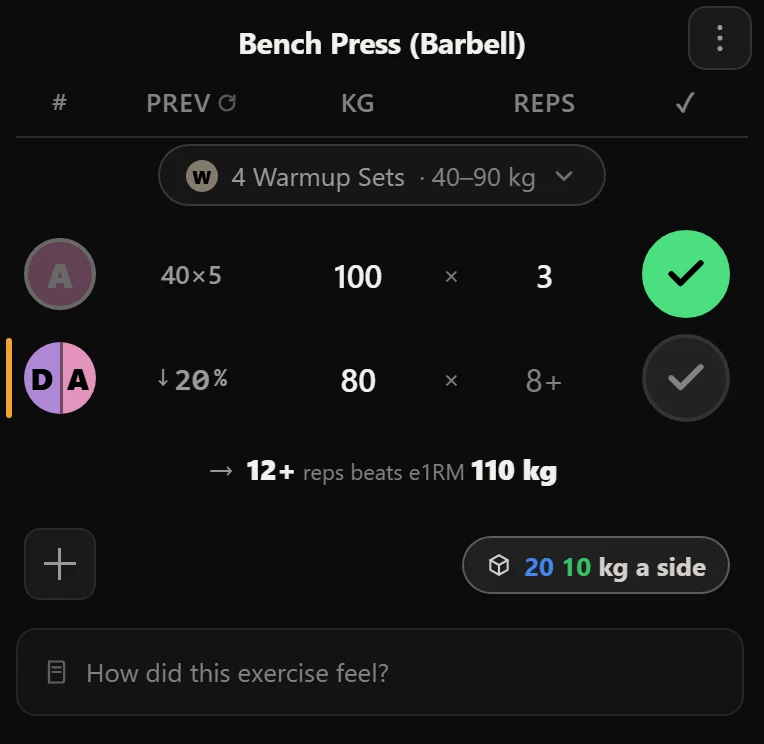
The colour on a set row's left edge shows its state before its type: a finished warmup goes green like any other completed set, and amber only ever means "this is the set you're on".
The rep max calculator
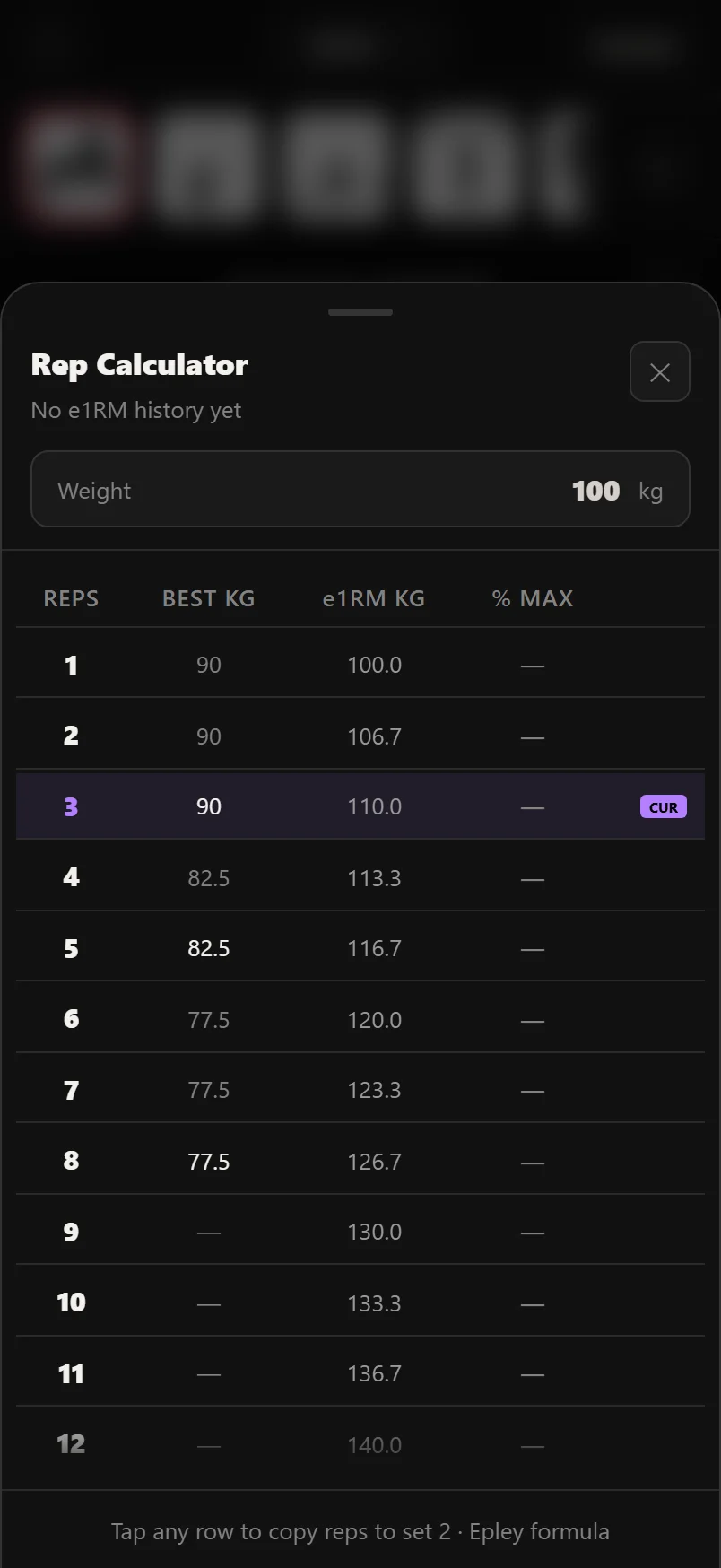
The 1RM button opens the rep max calculator: give it a weight and reps and it estimates your one-rep max with the Epley formula, plus a table of equivalent loads at every rep count. It uses the same estimate as the logger, the PR board and your goals.
The plate calculator
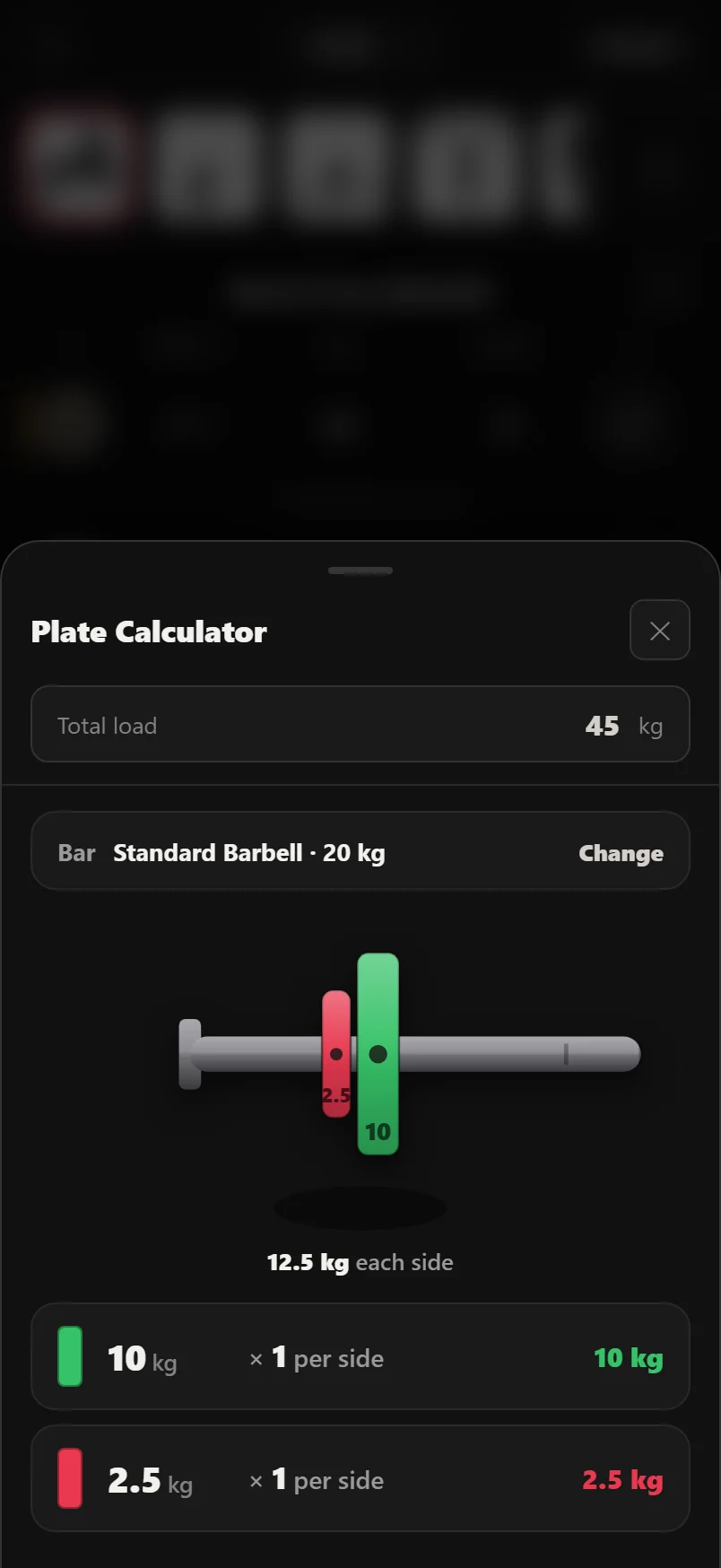
The plate calculator shows which plates to load per side, drawn to scale in the IWF competition colours (red 25s, blue 20s, yellow 15s, green 10s, white 5s), in your own unit. Kg and lbs each have their own bar and plate setup. It uses the plates you've told Durata you own, microplates included, in Settings > Plate Calculator, so it never suggests a plate your gym doesn't have.
Tap the bar row to change which bar you're loading. It opens the same Bar in use picker Setup uses, gym default and No Bar included. If the weight you enter is lighter than the bar, the total reads "Lighter than the bar".
The tool tray
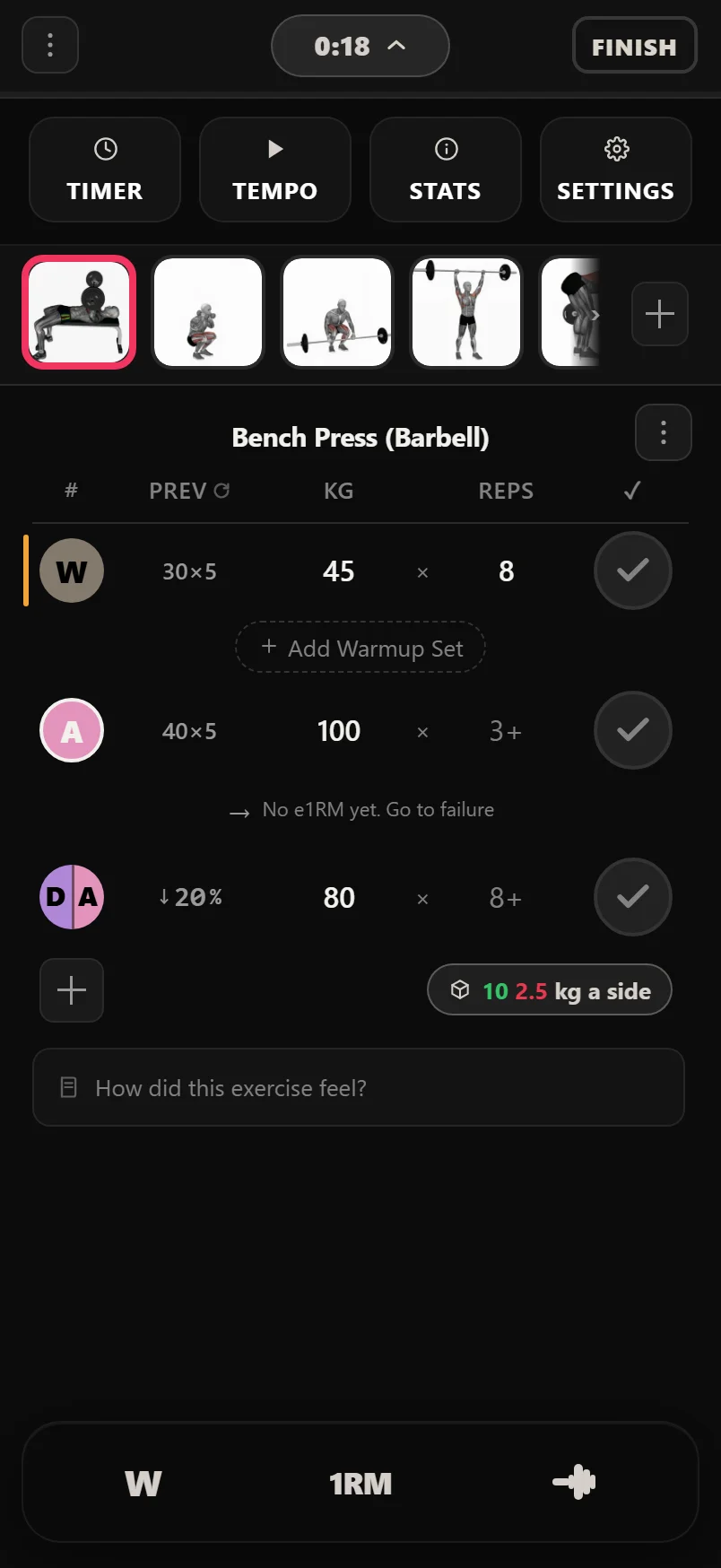
Tap the session timer pill in the workout header to open the tool tray: TIMER (a manual countdown with presets and a custom mm:ss input), TEMPO, STATS and SETTINGS. Only the pill opens or closes it, so ticking a set leaves it as it was. STATS opens the session sheet.
On dips, pull-ups, chin-ups and push-ups, volume counts you as well as the plates. Log a weighted dip as "+10 kg" and Durata values the set at your body weight plus 10; assisted variants count body weight minus the assistance, so using less assistance means more volume. It uses your most recent weigh-in from the last 30 days. The volume figure in the logger is marked BW while this is in effect; with no weigh-in in the last 30 days it is marked NO BW, and volume counts the added weight alone until you log one under Body.
Lifting to a tempo
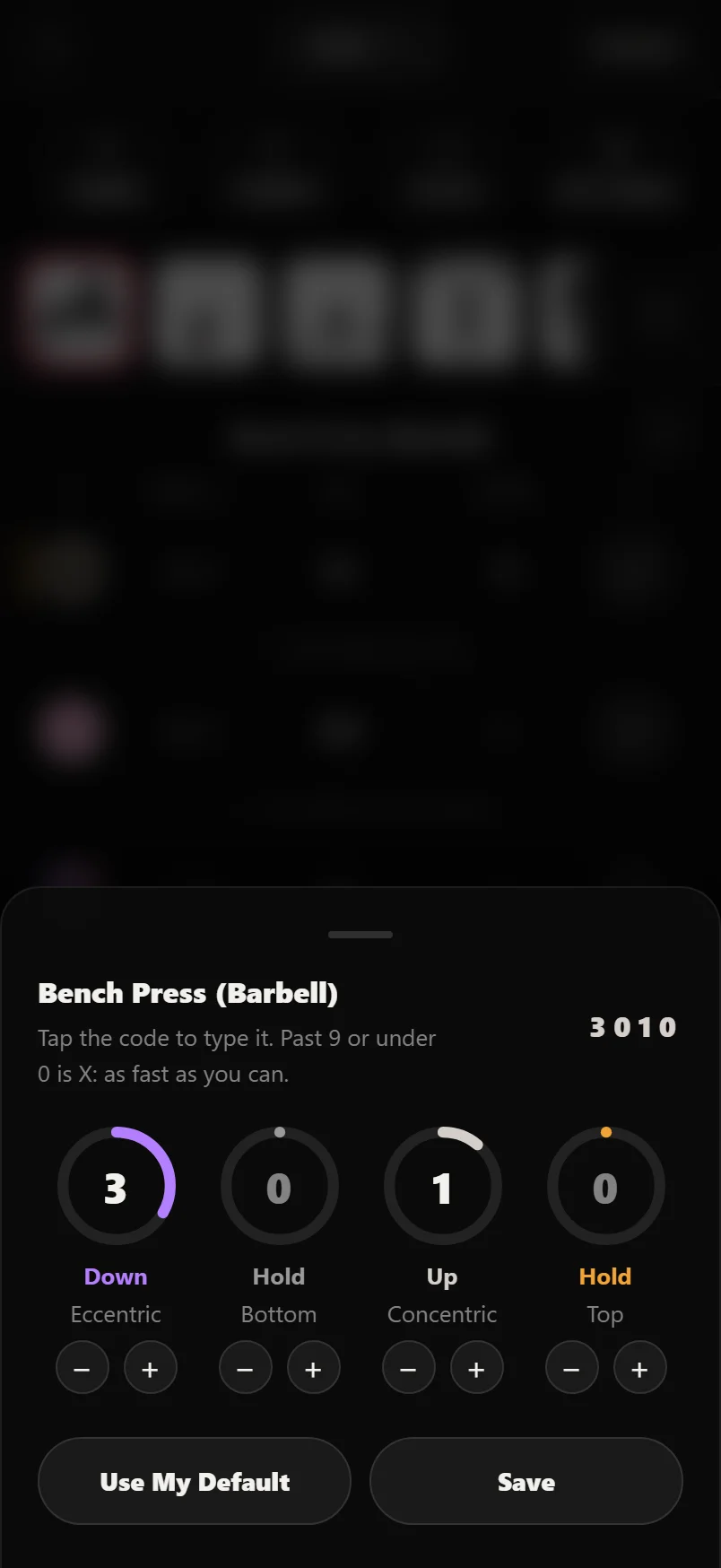
Tempo lifting, meaning controlling how long each phase of a rep takes, makes a weight harder without adding plates: more time under tension, stricter technique, no momentum. Coaches write it as four characters like 3-0-1-0: three seconds down, no pause, one second up, no pause at the top. An X means as fast as you can.
Durata's metronome beats that rhythm out loud so you don't have to count. Tap TEMPO in the tool tray to start it. A lift with its own tempo shows its code on the button, and the tempo can be set per lift in the planner. Long-press the button to edit the current lift's tempo; in a session from a plan, the change is saved to the plan's lift too. Lifts with no tempo of their own play the default from Settings.
Use it for paused bench and squats, slow-eccentric accessories, or any week where the plan says "3-1-1-0" and you'd otherwise be guessing at seconds mid-set.
Common questions
Where did my warmup sets go?
They folded away when you ticked the last one, so your working sets sit at the top of the card. The W chip in their place tells you how many there were and the range you ramped through. Tap it and the rows come back, ready to edit or untick.
Does the rest timer work with the screen locked?
Yes. When rest ends Durata fires a notification telling you what's next, even with the phone locked or the app in the background, and its sounds duck your music rather than pausing it.
How does Durata estimate my 1RM?
With the Epley formula (weight x (1 + reps/30)), calculated from your best genuine straight sets. The same formula is used everywhere: logger tips, the rep max calculator and your records.
Put it into practice
Durata is free to use — 50 proven programs, automatic progression, rest timers and PR tracking, all on your phone.